Our Top Picks
Start with the Kobo Clara BW if you mostly read novels. Its listings describe a 6-inch glare-free touchscreen with ComfortLight PRO, a dark mode option, waterproofing and 16GB of storage, which covers what most people want from an e-reader. Move to a colour model when covers, comics or cookbooks matter, and to the Elipsa 2E when you want a 10.3-inch screen with a stylus in the box. The list below covers four Kobo models across seven Amazon listings, because the Clara BW, Clara Colour and Libra Colour each appear twice, and everything here comes from the listing text alone.
Quick picks by reading style
As an Amazon Associate we earn from qualifying purchases at no extra cost to you.


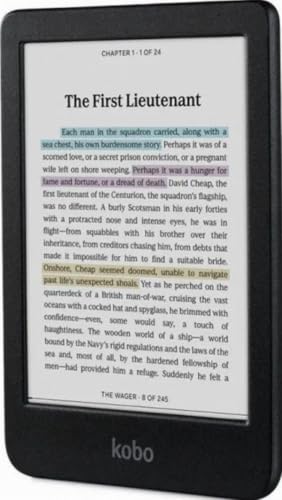


- Novels and commuting: Kobo Clara BW, either listing.
- Colour covers on a small screen: Kobo Clara Colour.
- A larger 7-inch colour page: Kobo Libra Colour.
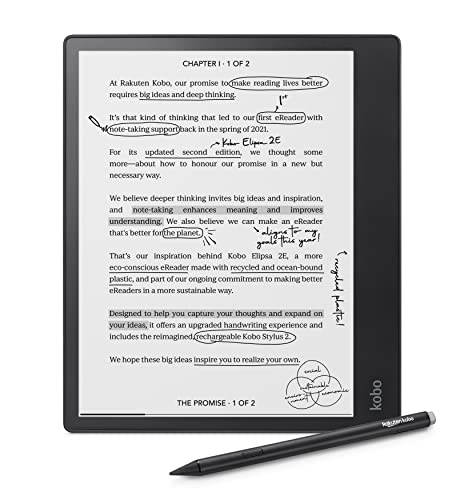
- Handwritten notes on 10.3 inches: Kobo Elipsa 2E.
All seven listings side by side
| Model | Key point from the title | Best for |
|---|---|---|
| Kobo Clara BW (black, first listing) | 6-inch glare-free touchscreen, ComfortLight PRO, waterproof, 16GB | Plain text reading |
| Kobo Clara BW (black, second listing) | Same name and core features, different listing copy | Comparing sellers |
| Kobo Clara Colour (white) | 6-inch colour E Ink Kaleido 3, dark mode option, 16GB | Colour covers, small screen |
| Kobo Clara Colour (black) | 6-inch colour E Ink display, waterproof, 16GB | Colour covers, small screen |
| Kobo Libra Colour (black) | 7-inch Color E Ink Kaleido 3, recycled materials | Comics and magazines |
| Kobo Libra Colour (white) | 7-inch colour E Ink Kaleido 3, dark mode option | Comics and magazines |
| Kobo Elipsa 2E | 10.3-inch screen, Kobo Stylus 2 included, 32GB, Wi-Fi | Notes and annotation |
The seven listings, one at a time
Kobo Clara BW, black (first listing)
This title lists a 6-inch glare-free touchscreen, ComfortLight PRO, a dark mode option, audiobooks, waterproofing and 16GB of storage. Black-and-white E Ink is the simplest way to read prose, and a 6-inch body is easy to hold one-handed. The title says nothing about colour or a stylus, so confirm any extra feature on the listing before you order. The ComfortLight PRO name in the title points to an adjustable front light for evening reading, though the manufacturer’s documentation is the place to confirm how it behaves.
Pros
- Waterproofing, dark mode and 16GB are all named in the title
- Small screen keeps the device light to carry
Cons
- Six inches is tight for PDFs or comics
- No colour display
Who it’s for: readers who want a straightforward, text-first Kobo.
Kobo Clara BW, black (second listing)
This is the same model under different listing copy: a 6-inch touchscreen, waterproof, 16GB, with ComfortLight PRO, dark mode, eBooks and audiobooks named in the title. Nothing in the text points to a different screen or storage size, so the choice between the two Clara BW pages comes down to seller, delivery and condition rather than hardware. A practical way to decide is to open both pages, compare what each says about warranty and returns, and pick the one with the clearer terms.
Pros
- Gives you a second route to the same model
- Core features match the first listing
Cons
- No spec advantage over the first listing
- You have to compare seller details yourself
Who it’s for: anyone who wants a Clara BW and finds the first listing unavailable.
Kobo Clara Colour, white
The title describes a 6-inch glare-free colour E Ink Kaleido 3 display, a dark mode option, waterproofing, audiobooks and 16GB of storage, in white. It keeps the Clara footprint while adding colour, which helps with book covers, highlights and illustrated pages. Colour E Ink panels generally look more muted than a tablet, so read buyer feedback on text sharpness first. Because the title also lists a dark mode option, you can flip to light text on a dark page at night, which some readers prefer.
Pros
- Colour display in a compact 6-inch body
- Waterproof and 16GB both appear in the title
Cons
- Colour E Ink is usually softer than black-and-white
- Small screen limits comics and magazines
Who it’s for: readers who want colour covers without carrying a bigger device.
Kobo Clara Colour, black
This listing covers the same Clara Colour idea in black, with a 6-inch glare-free colour E Ink display, dark mode option, waterproofing, audiobooks and 16GB. One flag: the title says only “Colour E Ink Display” and leaves out the Kaleido 3 name used on the white listing, so check the product page for the panel name before assuming the two are identical. Apart from that gap, the feature list matches the white listing, which makes this a colour-versus-finish choice more than a spec choice.
Pros
- Same headline features as the white listing
- Black finish if you prefer it
Cons
- Panel name is less specific in this title
- Colour trade-offs apply here too
Who it’s for: buyers who want a Clara Colour and prefer the darker body.
Kobo Libra Colour, black
The title lists a 7-inch Color E Ink Kaleido 3 screen, waterproofing, dark mode, eBooks, audiobooks and recycled materials. Seven inches gives comics, magazines and PDFs more room than a 6-inch Clara. Storage is not stated in the title, which matters for audiobooks and comics, so look for the capacity on the listing. The recycled-materials mention in the title is a build detail rather than a performance feature, and the manufacturer’s documentation explains what it covers.
Pros
- Larger colour screen than the Clara Colour
- Waterproofing is named in the title
Cons
- Storage size missing from the title
- Larger body is less pocketable
Who it’s for: comic, magazine and cookbook readers who want a bigger colour page.
Kobo Libra Colour, white
This white listing names a 7-inch glare-free colour E Ink Kaleido 3 display, a dark mode option, audiobooks and waterproofing. Like the black listing, it gives no storage figure in the title. A separate Kobo Stylus 2 listing says it works with the 7-inch Libra Colour, so note-taking is possible here, but the stylus is sold on its own. Compared with the black listing, the title wording differs slightly, so it is worth reading both pages if you have a colour preference.
Pros
- Glare-free colour screen at 7 inches
- Works with the separately sold Kobo Stylus 2 per that accessory’s listing
Cons
- No storage size in the title
- Stylus costs extra
Who it’s for: readers who want colour plus the option of handwritten notes later.
Kobo Elipsa 2E
The title lists a 10.3-inch glare-free touchscreen, ComfortLight PRO, adjustable brightness, Wi-Fi, Carta E Ink and 32GB of storage, with a Kobo Stylus 2 included. It is the only note-focused model here. The title does not mention waterproofing or colour, so do not assume either, and expect a much larger device than the Clara. Wi-Fi is named in the title; check the listing for anything beyond that, such as Bluetooth for audiobooks, rather than assuming it.
Pros
- Stylus included according to the title
- 32GB and a 10.3-inch page for documents
Cons
- Waterproofing is not mentioned in the title
- Large and heavy for one-handed reading in bed
Who it’s for: students and professionals who annotate documents and write notes.
How we picked these
We started with the Amazon listings supplied for this keyword and kept the ones that are actual Kobo e-readers. A Kobo Stylus 2 and a strap made for a Kindle Basic and the Kobo Nia are accessories, so they are not ranked, though the stylus comes up where it matters. Every claim comes from published specifications, manufacturer documentation and buyer reviews as summarised in the listing text. Nobody on the team used or measured these units. Where a title is silent on a feature, we say so rather than fill the gap.
What to look for in a Kobo
Screen size decides the use case
Six inches suits novels and fits a coat pocket. Seven inches makes comics, magazines and fixed-layout pages easier to read. The 10.3-inch Elipsa 2E is closer to a sheet of paper, which helps with documents but makes it clumsy on a commute. Choose the size for the heaviest reading you do, not the average. Weight and grip matter too: a bigger screen is lovely at a desk and tiring when you read lying down.
Colour is a trade, not an upgrade
Colour E Ink brings covers, charts and highlights to life, but it generally looks more muted than a tablet and can read slightly softer than black-and-white. If nearly everything you read is plain text, the Clara BW is the safer fit. If you read graphic novels or cookbooks, colour earns its place. Also keep in mind that dark mode and the front light work with either display type, so colour is only worth paying for if you will actually use it.
Read the title line for water, storage and audio
Waterproofing appears in the Clara BW, Clara Colour and Libra Colour titles but not in the Elipsa 2E title. Storage is 16GB on both Clara families, 32GB on the Elipsa 2E and unstated on the Libra Colour listings. Audiobooks are named on most titles; confirm supported formats and how you pair audio with the manufacturer’s documentation. If you plan to load many books, the larger 32GB figure on the Elipsa 2E gives the most headroom of the listed numbers.
Stylus support and note-taking
Only the Elipsa 2E title says a stylus is included, while the separate Kobo Stylus 2 listing names the 7-inch Libra Colour as compatible. If you never mark up pages, skip this category entirely and put the money toward a better screen size or colour.
A quick fit test
Worked example: you read two paperbacks a month on the train and the occasional graphic novel. Six inches handles the paperbacks, but comics would feel cramped, so the 7-inch Libra Colour is the better match. If the comics are rare, the Clara BW saves money and weight. Ask three questions: what is the biggest page you read, do you need colour, and will you write on it?
Buying mistakes to avoid
Buyers often treat the two listings of one model as different products and pay extra for the wrong page. Others assume a stylus is included when only the Elipsa 2E title says so. A third trap is skipping the colour trade-offs and expecting tablet-like vividness. Finally, check the colour name in the title: a white and a black unit can carry different listing text for the same model.
Two more slips are common. Shoppers sometimes buy a larger screen for comfort and then find it too bulky for the bag they carry. Others skip the storage line and only realise later that the capacity was never stated, which applies to the Libra Colour pages. A thirty-second read of each listing avoids most of these errors.
Our verdict
The Kobo Clara BW remains the default recommendation for text readers. Add colour with the Clara Colour or step to the 7-inch Libra Colour for comics, and keep the Elipsa 2E for people who annotate. When two listings share a model name, compare seller, condition and delivery before price. If you are unsure, start with the Clara BW: it names waterproofing, dark mode and 16GB in the title, and you can always move to a larger or colour model later if your reading habits change.
Kobo questions, answered
Which Kobo is best for most readers?
For plain novels, the Kobo Clara BW fits most people. Its listings describe a 6-inch glare-free touchscreen, ComfortLight PRO, dark mode, audiobooks, waterproofing and 16GB of storage. Choose a colour or larger model only if your reading includes covers, comics or documents, because that is where the extra screen area and colour help.
Is a colour Kobo worth it over the Clara BW?
It depends on what you read. Colour E Ink shows covers, highlights and illustrations, but it generally looks more muted than a tablet and may read slightly softer on text. If most of your library is plain prose, the Clara BW is the simpler choice. Comics and cookbooks are where colour tends to be worth it.
Are these Kobo e-readers waterproof?
The Clara BW, Clara Colour and Libra Colour titles in this roundup all say waterproof. The Elipsa 2E title does not mention waterproofing, so do not assume it. Titles do not say how deep or for how long the protection applies, so read the manufacturer’s documentation for what the protection covers and how to care for the device after exposure to water.
Do you need the Kobo Stylus 2?
Only if you want to write or mark up pages. The Elipsa 2E listing says a Kobo Stylus 2 is included. A separate Stylus 2 listing says it is compatible with the 7-inch Libra Colour. Clara models are not named in that compatibility line, so check the manufacturer’s documentation before buying one for a Clara.
Why are there two listings for the same Kobo model?
The Clara BW, Clara Colour and Libra Colour each appear twice because sellers list the same model in different colours or with different listing copy. Compare the seller, condition, delivery and any storage or panel details in the title. Titles that look identical can still differ in what they mention, so read the full page before ordering.
Related guides
- How To Store Books To Prevent Yellowing And Mold
- Book Stands For Hands-Free Reading
- Reading Glasses For Night Reading