Key takeaways
- Choose a chair size that matches your height and weight. Makers list limits on both.
- Set your seat so your thighs are roughly level with the floor and your knees are about at hip height.
- Adjust lumbar to meet the curve of your lower back and keep your shoulders relaxed.
- Set the arms so your elbows rest lightly, near the desk height.
- Check that your desk height works with the chair. A fixed-height desk may need a footrest.
- Keep the screen at eye level and take regular breaks. Standing, stretching and walking matter as much as the chair.
No chair corrects posture on its own, but a well-adjusted ergonomic chair such as the Herman Miller Aeron, Steelcase Leap or Gesture, or a value option like the Branch Ergonomic Chair makes a neutral sitting position easier to hold. The best pick for most people is the model whose seat depth, lumbar support and arm adjustments actually fit their body and desk, and a good fit matters more than any marketing label about posture.
Our top picks


As an Amazon Associate we earn from qualifying purchases at no extra cost to you.
What “Posture Correcting” Really Means
Chair makers use phrases like posture support to describe features that encourage an upright sitting position: adjustable lumbar support, seat depth, backrest recline and armrests that let your shoulders relax. A chair can help you sit well, but it cannot force you to. Most ergonomics guidance emphasises changing position often and taking breaks. If you have ongoing back, neck or hip pain, see a doctor or physiotherapist, because a chair is not a treatment.
At a Glance: Chairs Compared
| Chair | Best for | Features the maker lists | Limits |
|---|---|---|---|
| Herman Miller Aeron | Long hours; mesh comfort | PostureFit SL back support for pelvis and lower back, three sizes, adjustable arms | Premium tier; mesh feels firm to some |
| Herman Miller Embody | Computer-focused posture | Maker describes pixelated support aimed at spinal contact when you sit and lean | Premium tier; fit is distinctive |
| Steelcase Leap | Different body shapes | LiveBack technology and adjustable lumbar, per the maker | Premium tier; many options to learn |
| Steelcase Gesture | Many arm positions and devices | Maker designs arms that move with the user, adjustable backrest | Premium tier |
| Branch Ergonomic Chair | Home offices at mid-range | Adjustable lumbar, seat depth and headrest on some versions per the maker | Fewer adjustment options than premium chairs |
| Autonomous ErgoChair | Value ergonomic seating | Maker lists adjustable lumbar, headrest and arms | Quality varies by version |
| Secretlab Titan Evo | Gaming-style chair with lumbar | Maker lists integrated adjustable lumbar and magnetic head pillow | Bucket-style seat not for everyone |
| Hbada and Sihoo mesh chairs | Budget buyers | Makers list lumbar support and adjustable arms | Material and support feel differ |
Specifications and sizes change with each production run, so check the maker’s page for dimensions, weight limits and warranty.
The Features That Matter Most
Lumbar support
A backrest that fills the curve of your lower back helps you avoid slumping. Adjustable lumbar lets you set height and depth, while fixed lumbar suits people who match the chair’s shape. Look for a model whose support lands at your waistline.
Seat depth and height
You should be able to sit with your back supported and leave a gap of a few fingers between the seat edge and the back of your knees. Feet should rest flat on the floor, or on a footrest. Seat height and depth adjustments let you set this, which matters for shorter and taller people.
Armrests
Adjustable arms keep your shoulders relaxed. Four-way arms move up, down, in and out, while two-way arms are simpler and cheaper. Poorly set arms can push your shoulders up and strain your neck.
Recline and tilt
A synchronised tilt moves the seat and backrest together and lets you lean back while staying supported. Tension controls adjust the resistance to your weight.
Material
Mesh breathes, which helps in warm rooms, while foam and fabric feel softer. Leather-style materials can feel hot. Choose by comfort and climate.
Premium Chairs: Aeron, Embody, Leap and Gesture
The Aeron is the classic mesh chair, and the maker lists three sizes and PostureFit SL support aimed at the pelvis and lower back. Reviewers praise its breathability and range of adjustments, but note that the firm mesh and sizing need care. The Embody is described by the maker as designed for computer work with a flexible backrest, and many reviewers like it but find it expensive. Steelcase’s Leap and Gesture are known for flexible fit, with the Gesture’s arms designed to follow movement around phones, tablets and keyboards. These premium chairs usually carry long warranties, which is one reason people choose them for all-day use.
Mid-Range and Budget Chairs
The Branch Ergonomic Chair and Autonomous ErgoChair aim to provide key adjustments for home offices at a lower tier. Reviewers generally find them comfortable but note fewer fine-tuning options than premium chairs. Gaming-style chairs like the Secretlab Titan Evo include adjustable lumbar and a head pillow, but the bucket shape and side bolsters feel confining to some people. Budget mesh chairs from brands such as Hbada and Sihoo offer lumbar support at a lower cost, though quality control varies.
Fit and Setup Notes
- Choose a chair size that matches your height and weight. Makers list limits on both.
- Set your seat so your thighs are roughly level with the floor and your knees are about at hip height.
- Adjust lumbar to meet the curve of your lower back and keep your shoulders relaxed.
- Set the arms so your elbows rest lightly, near the desk height.
- Check that your desk height works with the chair. A fixed-height desk may need a footrest.
- Keep the screen at eye level and take regular breaks. Standing, stretching and walking matter as much as the chair.
Small Habits That Make Any Chair Work Better
Even the best chair cannot hold you in one position for hours. Set a reminder to stand up every half hour or so, roll your shoulders, and look away from the screen. Keep your keyboard close enough that your elbows stay near your sides, and place your screen so you do not need to tilt your head up or down.
Check your setup from the side if you can: ears roughly over shoulders, shoulders over hips, hips and knees at comfortable angles. If your chair has a headrest, use it for brief reclined breaks instead of leaning forward while typing. Laptop users do better with a separate keyboard and a raised screen, since a laptop alone forces either the head or the wrists into an awkward position.
When trying a new chair, give your body a week or two to adjust, and change settings in small steps. If discomfort continues, or you notice numbness or ongoing pain, speak with a doctor or physiotherapist instead of buying another chair. Many workplaces also offer an ergonomic assessment, which can be a useful first step.
Budget Tiers
- Budget tier: Hbada, Sihoo and similar mesh chairs with basic lumbar and arms.
- Mid-range tier: Branch, Autonomous and Secretlab chairs with more adjustment and warranty support.
- Premium tier: Herman Miller and Steelcase chairs with extensive adjustment, multiple sizes and long warranties.
Pick X If… Decision Table
| If you want… | Pick | Why |
|---|---|---|
| Premium all-day comfort and sizes | Herman Miller Aeron | Mesh with pelvis and lumbar support in three sizes |
| Strong support for computer work | Herman Miller Embody | Backrest designed for upright and reclined computer use |
| Flexible fit for varied bodies | Steelcase Leap | Adjustable lumbar and backrest |
| Arms that follow your devices | Steelcase Gesture | Arm design for multiple postures |
| A good home office chair at mid-range | Branch Ergonomic Chair | Core adjustments without premium cost |
| A gaming-style look with lumbar | Secretlab Titan Evo | Integrated lumbar and head pillow |
| The lowest tier | Hbada or Sihoo mesh chair | Basic support for a small outlay |
Alternatives Worth Considering
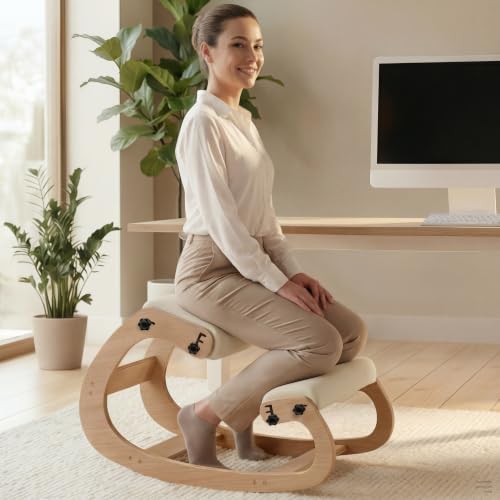
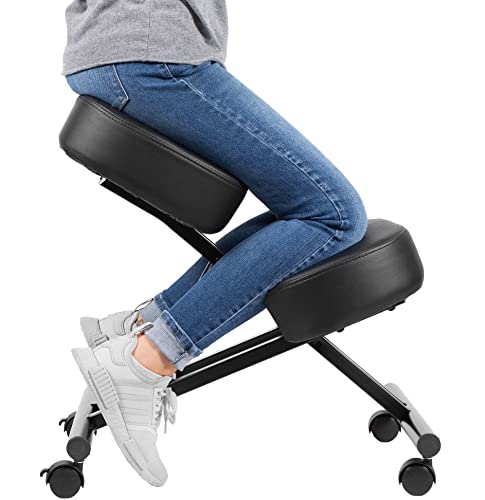
- Kneeling or saddle chairs: These open the hip angle, but some users find the knees uncomfortable for long sessions.
- Stability ball or active seating: A short-term option for movement, though most guidance suggests using them in moderation.
- Standing desk plus chair: Alternating positions reduces the time you spend in any one posture.
- Add-on lumbar cushions: A low-cost way to improve an existing chair, though less adjustable than built-in support.
Frequently Asked Questions
Can a chair fix bad posture?
A chair can make a good position easier, but it does not fix posture by itself. Habits, desk setup, movement and strengthening all matter. If you have persistent pain, a doctor or physiotherapist can give individual guidance.
What is the most important chair feature for posture?
Many ergonomists point to adjustable lumbar support combined with the right seat height and depth. A feature that does not fit your body will not help, so adjustability and size choice come first.
Is mesh better than cushioned fabric?
Mesh breathes and keeps you cooler, which helps in warm rooms. Cushioned seats feel softer to some people. Choose based on comfort and how long you sit.
Are gaming chairs good for posture?
Some models include adjustable lumbar and head support, but the racing-style shape does not suit everyone. Compare the adjustments to an office ergonomic chair before deciding.
How long should I sit before moving?
Most health and workplace guidance recommends changing position regularly, with short breaks to stand and move. There is no single perfect interval, so use a timer if you tend to forget.
Do I need a footrest?
If your feet do not rest flat on the floor when the chair is at the right height, a footrest can help. It is especially useful for shorter users at a fixed-height desk.
More from Amazon
Programs that pair well with the guide above. Offers and eligibility are set by Amazon and may change.
Read from a large library of eBooks and audiobooks on any device. Check Amazon for current plans.
Explore Kindle UnlimitedAudiobooks and podcasts to listen to on the go. Eligible new members can start with a free trial.
Try Audible freeFree shipping on eligible items, Prime Video and more. Eligible new members can start with a free trial.
Start a Prime free trialAd-free music streaming. Eligible new subscribers can start with a free trial.
Try Music Unlimited freeAs an Amazon Associate we earn from qualifying purchases.