Key takeaways
- Keep the ambient light dimmer than the screen and avoid strongly coloured walls near the monitor.
- Match the colour temperature of the room light and the print viewing light to the standard you work to.
- Do not use a bulb above the lamp’s rated wattage, and follow the maker’s manual for the plug and clamp.
- Use a lamp with a dimmer so you can reduce brightness during long sessions.
- Calibrate the monitor with a hardware colorimeter at regular intervals; a lamp does not replace calibration.
- Avoid mixing different bulbs in the same room, which causes uneven colour.
For a photo editing room, the BenQ ScreenBar family suits people who want monitor-mounted light that avoids screen glare, a high-CRI lamp from a specialist such as Waveform Lighting suits those who want the most colour-faithful light on prints and surroundings, and a standard desk lamp fitted with a high-CRI LED bulb is the budget route. The main point is that colour accuracy comes from the light source’s rendering, not from brightness, so check the stated CRI and colour temperature before anything else.
At a glance: lamp types for colour-critical rooms
| Option | Best for | Key stated traits | Limits | Tier |
|---|---|---|---|---|
| BenQ ScreenBar series | Lighting the desk without reflecting on the monitor | Clips on top of the monitor, asymmetric optics aimed at the desk, adjustable brightness and colour temperature; the maker lists high-CRI output on the Halo model | Lights the keyboard area, not a wall or a print wall; needs a monitor that can carry it | Mid-range |
| BenQ WiT and similar desk lamps | A freestanding task lamp for reading prints | Adjustable arm, colour temperature and brightness control | Fewer high-CRI claims on some models; read the spec sheet | Mid-range |
| Waveform Lighting high-CRI lamps and bulbs | Colour-critical work with documented spectrum | The seller publishes spectral data and high-CRI figures for its LEDs | Fewer styling options; ordering from a specialist | Mid-range to premium |
| A neutral desk lamp with a high-CRI bulb | The lowest-cost route to better colour | Choose a bulb that lists a high CRI and a fixed colour temperature | Quality depends on the bulb; no built-in dimming on some lamps | Budget |
| Aputure, Godox or Nanlite LED panels and bulbs | Photo or video lighting kits that can also light a room | Makers list high-CRI output and dimming control | Built for stands and studios, not tidy desk use | Mid-range to premium |
What makes a lamp colour accurate
CRI and why it matters
CRI, the colour rendering index, describes how faithfully a light shows the colours of objects compared with a reference light. A common guideline for colour work is to choose light listed at CRI 90 or higher, and many photographers prefer 95 or above. Cheap LED lamps often list lower figures, and some do not publish any.
Other measures to look for
CRI can hide weaknesses in some colours, notably deep reds, so some makers also publish R9 values or a TM-30 report. A lamp that publishes these is easier to judge. If a maker lists only a general claim of natural light, treat that with caution.
Colour temperature
Many photo editors use a neutral setting around 5000K to 6500K for print comparison and screen calibration, depending on their workflow and the standard for their display. Lamps with adjustable colour temperature let you match the standard that your monitor and print workflow use, and warmer settings are more comfortable in the evening.
Flicker and dimming
Some LEDs flicker at low brightness, which can cause eye strain. Makers sometimes describe flicker-free drivers, and reviewers sometimes test with a camera in slow motion. Dimmable lamps that hold their colour at low levels are better for long sessions.
Glare and screen reflections
A lamp that shines on the monitor changes how you perceive the image. Monitor-mounted bars are designed to throw light on the desk, not on the screen, and some desks use a lamp placed off to the side with a shade. Room lighting should be dimmer than the screen and should not spill colour onto it.
Picks by need
BenQ ScreenBar series
The ScreenBar clips on top of the monitor and lights the desk with an asymmetric beam so the screen stays free of reflections. BenQ lists adjustable brightness and colour temperature on its models, and the Halo version adds a wireless controller and back light. It is a compact choice for editors who have limited desk space. The limits are that it lights the desk area only and that monitors with unusual tops may not hold it well. If you edit prints, check that the model you choose lists a high CRI.
Waveform Lighting
Waveform Lighting sells LEDs and lamps for people who care about spectrum, and it publishes data for its products. That helps when you need to confirm that the light is suitable for colour comparison. It suits editors who want evidence rather than marketing claims. The trade-off is fewer designer-style lamps and more of a specialist-shop experience.
High-CRI bulb in a regular lamp
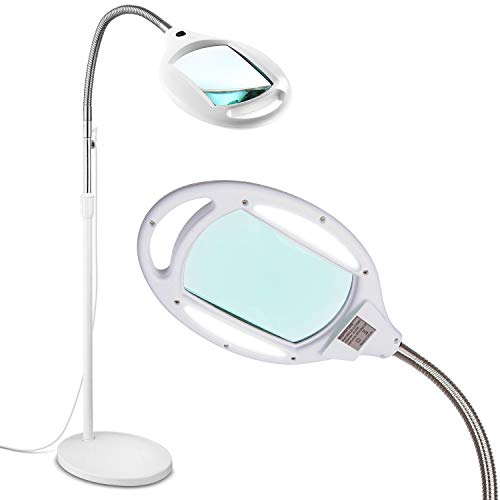
The cheapest route to better colour is a plain adjustable lamp and a bulb that lists a high CRI at a stated colour temperature. Check that the bulb fits the socket and the lamp’s wattage limit, and follow the lamp’s manual. This approach works well for lighting a print review corner, although it gives less control than a dimmable lamp.
Studio LED lights
Aputure, Godox and Nanlite sell LEDs for photo and video that list high CRI figures and dimming control. They can serve as bias lighting or print lighting, but they are designed for stands and are often more than a desk needs. If you already own one for shooting, it may double as editing light.
Pick this if
| If you … | Pick | Why |
|---|---|---|
| have a small desk and a glossy monitor | BenQ ScreenBar | Monitor-mounted, avoids screen reflections |
| compare prints under controlled light | Waveform Lighting high-CRI lamp | Published spectrum data |
| need the lowest-cost improvement | High-CRI bulb in a neutral lamp | Cheap, effective if the bulb is well specified |
| already own studio gear | Aputure or Godox LED | High-CRI output you may already have |
| edit late in the evening | A lamp with adjustable warmth | Softer light after dark |
Room set-up and safety notes
- Keep the ambient light dimmer than the screen and avoid strongly coloured walls near the monitor.
- Match the colour temperature of the room light and the print viewing light to the standard you work to.
- Do not use a bulb above the lamp’s rated wattage, and follow the maker’s manual for the plug and clamp.
- Use a lamp with a dimmer so you can reduce brightness during long sessions.
- Calibrate the monitor with a hardware colorimeter at regular intervals; a lamp does not replace calibration.
- Avoid mixing different bulbs in the same room, which causes uneven colour.
Alternatives
- Bias lighting behind the monitor: A neutral light strip behind the screen can reduce eye strain and improve perceived contrast.
- A print viewing booth or standard illuminant lamp: For professional print matching, a dedicated viewing light is the next step above a desk lamp.
- A monitor hood: Cuts stray light on the screen when the room is bright.
- Smart bulbs: Convenient, but many smart bulbs list lower CRI, so look for models that state a high rating.
Getting the most from your lamp
Placement
Place the lamp so that light falls on the desk and prints, not on the screen. Aim for an angle that avoids reflections in the monitor and shadows from your own hand. A lamp to the side opposite your writing hand is a common arrangement for right-handed or left-handed work.
Consistency
Use the same lamp, colour temperature and brightness whenever you review prints. Changing these between sessions makes comparisons unreliable. Some editors mark the dimmer position or use a preset to keep it constant.
Warm-up and ageing
Many LEDs settle after a short warm-up and may shift slightly over their lifetime. If colour consistency is vital, let the lamp run for a few minutes before judging a print and replace aged units as a set.
Reflections and surfaces
Glossy desk surfaces and white paper can bounce light into your eyes and tint the screen. A matte desk mat in neutral grey reduces this problem and gives a stable background for prints.
Frequently Asked Questions
What CRI should a photo editing lamp have?
Many photographers aim for 90 or above, and 95 or above is common on lamps sold for colour work. A published R9 value adds confidence about reds. If a maker does not list a CRI, treat it as unknown.
Does a lamp change how my photos look on screen?
The lamp does not change the screen itself, but it changes how your eyes see the screen and your prints. Strong or coloured light in the room can make the display look warmer or cooler than it is. Keeping the room light neutral and moderate helps.
Is 5000K or 6500K better?
It depends on the standard your display and print workflow follow. Many print workflows use around 5000K and many screens target 6500K. Pick the temperature that matches your workflow and keep it consistent.
Are monitor light bars good for colour work?
They are good for lighting the desk without reflecting on the screen. Whether they suit colour-critical work depends on the model’s stated CRI and colour temperature range. Check the spec sheet for the exact model.
Do I still need to calibrate my monitor?
Yes. A good lamp helps you judge prints and reduces glare, but a calibration device measures the screen itself. The two jobs are separate.
Can I use a regular LED bulb?
You can, but many bargain bulbs list a low CRI or none at all. Choose a bulb that states a high CRI and a fixed colour temperature, and use it within the lamp’s rated limits.
More from Amazon
Programs that pair well with the guide above. Offers and eligibility are set by Amazon and may change.
Read from a large library of eBooks and audiobooks on any device. Check Amazon for current plans.
Explore Kindle UnlimitedAudiobooks and podcasts to listen to on the go. Eligible new members can start with a free trial.
Try Audible freeFree shipping on eligible items, Prime Video and more. Eligible new members can start with a free trial.
Start a Prime free trialAd-free music streaming. Eligible new subscribers can start with a free trial.
Try Music Unlimited freeAs an Amazon Associate we earn from qualifying purchases.