Key takeaways
- Use the recommended pens: Makers list specific pen families. Regular ink may not wipe off.
- Let ink dry before scanning: A few seconds of drying reduces smears.
- Do not use a soaking wet cloth: The makers advise a lightly damp cloth, and too much water can damage the page coating.
- Keep pages away from heat: Many erasable inks respond to heat. A hot car or direct sun can fade writing, so scan important pages promptly.
- Back up scans: If a page matters, check the scan landed in your cloud folder before wiping.
- Wipe regularly: Leaving ink on pages for a long time can make removal harder, according to reviewers.
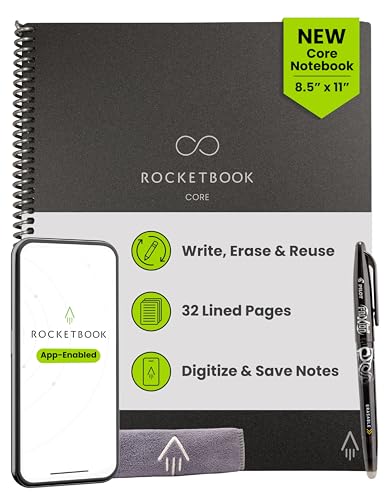
The Rocketbook Core suits most people who want a low-cost reusable notebook that sends scans to the cloud, the Rocketbook Fusion suits planners who want calendar and to-do pages built in, the Elfinbook suits buyers who prefer a wipe-clean notebook with a more traditional look, and an e-paper tablet suits anyone who wants to write digitally without any scanning step. All of the paper options work on the same basic idea: write with a compatible pen, scan the page with a phone app, then wipe it clean and reuse it.
Our top picks


As an Amazon Associate we earn from qualifying purchases at no extra cost to you.
How Reusable Smart Notebooks Work
A reusable smart notebook has pages coated with a special surface. You write with a pen that uses erasable ink, such as the Pilot FriXion line recommended by Rocketbook, and the ink sits on the coating instead of soaking into the paper. After you finish, you scan the page with a phone app, which can send the image to destinations you have set up, such as cloud storage or email, using symbols printed at the bottom of each page. To reuse the page, you wipe it with a slightly damp cloth.
The main appeal is less waste and a searchable archive of handwritten notes. The main limit is that you rely on a phone scan and compatible pens, and that the pages can smear if they get wet or too warm before you scan them. Some reviewers also mention that ghosting can remain after repeated wiping.
At a Glance: Reusable Notebooks Compared
| Product | Best for | Key stated features | Limits |
|---|---|---|---|
| Rocketbook Core | General note-taking | Reusable pages, app scanning, symbols for destinations; available in several sizes and page styles per the maker | Pages are wiped with a damp cloth; needs compatible pens |
| Rocketbook Fusion | Planners and busy schedules | Maker lists a mix of page styles including calendar, task lists and notes in one book | More page types means fewer blank pages for notes |
| Rocketbook Wave (previous generation style) | Those who liked microwave erasing | Maker’s design used heat from a microwave to clear pages | Availability varies; the damp-cloth models are easier to find |
| Elfinbook | A notebook with a classic look | Maker describes a wipe-clean notebook with app scanning and a compatible pen | Smaller ecosystem and fewer sizes than Rocketbook |
| reMarkable and similar e-paper tablets | Heavy handwriting and PDF markup | Digital pen on e-paper, built-in storage, sync features per the makers | Premium tier; needs charging |
| Kindle Scribe and Boox models | Readers who also take notes | E-ink screens with stylus support per the makers | Note-taking tools differ by model |
Rocketbook Core: The Default Choice
Rocketbook’s Core line is the best-known reusable notebook. The maker sells it in several sizes and page styles, including dot-grid, lined and graph, and it ships with a compatible pen in many bundles. Reviewers generally credit it with making the scanning workflow simple: open the app, frame the page, and the symbols determine where the scan goes. Complaints centre on the learning curve for setting up destinations, occasional smudging if you write before the ink has dried, and the fact that pages cannot go through a regular printer.
Core is a good fit for students, meeting notes and sketching ideas. It is less ideal for long, detailed writing where you want permanent paper.
Rocketbook Fusion: A Notebook with a Planner Built In
Fusion combines planner pages with note pages. The maker lists calendar views, task lists and several writing page layouts, which suits people who want one book to handle appointments and notes. The trade-off is flexibility: if you mostly want blank pages, a Core is simpler. Reviewers also note that planner pages may not match your preferred week layout.
Elfinbook: A Different Take on the Idea
Elfinbook is another wipe-clean notebook with app scanning. The maker emphasises a more traditional notebook look and compatibility with FriXion-style pens. Reviewers describe its experience as similar to Rocketbook, with a smaller app ecosystem. If you like the design and can find your preferred size, it is a reasonable alternative.
Digital Options That Replace the Scan Step
Some buyers want reusable notes without wiping pages at all. E-paper tablets such as reMarkable and Boox devices, and tablets such as the Kindle Scribe, store handwriting digitally and keep it searchable. They sit in the premium tier and need regular charging, but they remove the pen-and-cloth step and let you annotate documents. If you do not mind a screen-free paper feel, a reusable paper notebook stays the more affordable route.
Practical Tips and Care Notes
- Use the recommended pens: Makers list specific pen families. Regular ink may not wipe off.
- Let ink dry before scanning: A few seconds of drying reduces smears.
- Do not use a soaking wet cloth: The makers advise a lightly damp cloth, and too much water can damage the page coating.
- Keep pages away from heat: Many erasable inks respond to heat. A hot car or direct sun can fade writing, so scan important pages promptly.
- Back up scans: If a page matters, check the scan landed in your cloud folder before wiping.
- Wipe regularly: Leaving ink on pages for a long time can make removal harder, according to reviewers.
Who Benefits Most, and Who Should Skip Them
Reusable notebooks suit students, meeting-heavy workers, sketchers and anyone who fills paper quickly and rarely rereads it. The scan step turns a messy page into a file you can search by name or folder, and the wipe step keeps the book useful for months. They are a weaker match for people who write long journals they want to keep on paper, for writers who find the ink smears before it dries, and for anyone who dislikes using a phone app.
Think about the whole routine before buying. You write, wait a moment, scan, check the upload and wipe. If that sequence sounds like a chore, the notebook will end up in a drawer. If it sounds like a tidy way to avoid piles of paper, the idea fits. Reviewers also advise keeping a small cloth beside the notebook so wiping becomes a habit, and storing the notebook flat and away from heat and moisture so the coating stays smooth.
It is also worth thinking about privacy. Scans travel through the maker’s app to services you pick, so read the app’s privacy policy and avoid putting sensitive information such as passwords or health records on a page you plan to upload.
Budget Tiers
- Budget tier: Entry-sized Rocketbook Core notebooks and similar small wipe-clean books, ideal for trying the idea.
- Mid-range tier: Larger Core, Fusion and Elfinbook options, often sold in bundles with pens and cloths.
- Premium tier: E-paper tablets with handwriting recognition and document markup.
Pick X If… Decision Table
| If you want… | Pick | Why |
|---|---|---|
| The easiest start | Rocketbook Core | Wide size range and a mature scanning app |
| A notebook that doubles as a planner | Rocketbook Fusion | Calendar and task pages included |
| A classic notebook look | Elfinbook | Wipe-clean design with app support |
| No paper and no wiping | E-paper tablet | Digital pen with searchable notes |
| To read and take occasional notes | Kindle Scribe or similar | Reader with stylus support |
| Permanent record of ideas | A regular notebook | No scan or erase dependency |
Alternatives Worth Considering
- Standard notebook plus a scanning app: Apps such as Microsoft Lens, Adobe Scan or Apple Notes can digitise ordinary paper, though you do not get the reusable benefit.
- Smart pens: These capture handwriting on special paper and sync it digitally. They suit people who want permanent paper with a digital copy.
- Tablet and stylus: A tablet with a stylus can replace paper entirely, at the cost of a screen feel.
Frequently Asked Questions
Are reusable smart notebooks really reusable forever?
The makers describe them as reusable many times, but the page coating can wear with repeated wiping. Reviewers report that pages last a long time with gentle care, though stubborn ghosting can build up on heavily used sheets.
Can I use any pen?
Not reliably. Makers recommend specific erasable pens such as Pilot FriXion. Ordinary ballpoints and permanent markers may leave marks that do not wipe clean.
Do I need an app?
You need the maker’s app to scan pages and send them to cloud services. You can still write and wipe without the app, but you lose the digital capture.
Will my notes be searchable?
Some apps offer handwriting transcription, but accuracy depends on your handwriting. Check the app’s features for the notebook you choose.
Can I microwave my notebook to erase it?
Only models designed for it, and only by following the maker’s instructions. For damp-cloth models, do not use a microwave, because it could damage the notebook.
Is a reusable notebook better than an e-paper tablet?
It depends on your priorities. Reusable notebooks are cheaper and feel like paper, while e-paper tablets remove the scan and wipe steps and handle documents better, but cost more and need charging.
More from Amazon
Programs that pair well with the guide above. Offers and eligibility are set by Amazon and may change.
Read from a large library of eBooks and audiobooks on any device. Check Amazon for current plans.
Explore Kindle UnlimitedAudiobooks and podcasts to listen to on the go. Eligible new members can start with a free trial.
Try Audible freeFree shipping on eligible items, Prime Video and more. Eligible new members can start with a free trial.
Start a Prime free trialAd-free music streaming. Eligible new subscribers can start with a free trial.
Try Music Unlimited freeAs an Amazon Associate we earn from qualifying purchases.