Key takeaways
- Compare stylus tablets for college note taking and textbook reading, from an included S Pen and a large 3K screen to an e-textbook friendly iPad.
Choosing a tablet for college means choosing two tools at once: a notebook you can write in during a fast lecture, and a reading screen that can hold a heavy textbook without making diagrams, footnotes, and highlighted passages hard to follow. A tablet that writes beautifully but renders textbook PDFs in tiny, blurry text will frustrate you by midterms, and so will a sharp reading screen paired with a stylus that lags or costs extra.


This guide is for students who handwrite notes, students who mostly annotate assigned readings, and students who split the day between the two. The four tablets below were selected from their Amazon listing names and specifications, with a clear split: three include a stylus in the box, and one supports a stylus that is bought separately, so read the box contents carefully before you decide.
Quick Picks
As an Amazon Associate we earn from qualifying purchases
| Product | Best for | Key spec from title |
|---|---|---|
| Samsung Galaxy Tab S10 FE 128GB, Silver | Balanced lectures and reading in one tablet | S Pen included, 90 Hz refresh, IP68 water-resistant |
| Apple iPad 11-inch A16 128GB, Blue | Textbook apps and a wide reading ecosystem | 11-inch Liquid Retina display, A16 chip, Wi-Fi 6 |
| Lenovo Idea Tab Pro 128GB, Luna Grey | Long textbook chapters on a large screen | 12.7-inch 3K LCD display, pen and folio case included |
| Samsung Galaxy Tab S10 Lite 128GB, Gray | Handwritten notes with expandable storage | S Pen for note-taking, storage expandable up to 2TB |
How to Choose
Decide Whether the Stylus Is in the Box or an Extra Purchase
The first check is also the easiest to miss: some tablets include the pen, and some only support one. The Samsung Galaxy Tab S10 FE, the Samsung Galaxy Tab S10 Lite, and the Lenovo Idea Tab Pro each list a pen in the box, so you can start handwriting on the first day of classes. The Apple iPad listing supports the Apple Pencil (USB-C) and the first-generation Apple Pencil, but neither pencil is listed as included. If you want an iPad for handwritten notes, plan that separate purchase from the start rather than discovering it at checkout.
Match Screen Size to How You Read Textbooks
A textbook page carries more than prose: it carries margin notes, figure captions, tables, and end-of-chapter questions, often side by side. A 10.9-inch or 11-inch screen handles a single page comfortably and stays easy to carry between lectures. The Lenovo Idea Tab Pro steps up to a 12.7-inch 3K LCD display, which gives split views more room, so a chapter and a notes page can sit next to each other without constant zooming. If most of your reading is novels or single-column articles, the smaller screens are enough. If your courses use dense, two-column PDFs, the larger panel earns its extra size.
Check Resolution and Refresh for Writing Comfort
Resolution decides how crisp small textbook type looks at reading distance, while refresh rate affects how smoothly the pen line follows your hand. The iPad pairs its 11-inch Liquid Retina display with a 2360-by-1640 resolution, the Lenovo lists a 3K display, and the Galaxy Tab S10 Lite lists a 2112 x 1320 maximum resolution. For writing feel, the Galaxy Tab S10 FE lists a 90 Hz refresh rate, which helps handwritten strokes keep up during fast lectures. None of these numbers replaces trying your own handwriting speed, but together they separate reading-first screens from writing-first ones.
Plan Storage for a Full Degree, Not One Semester
Textbook files, recorded lectures, scanned handouts, and note archives grow quietly, and a tablet that feels roomy in September can feel tight two years later. All four tablets here start at 128GB, which suits cloud-based reading and modest local files. The difference is expansion: the Galaxy Tab S10 Lite lists storage expandable up to 2TB, so a card can absorb a growing library without replacing the tablet. The iPad listing has no expansion route, so its starting capacity is the capacity you keep. Students who download whole textbook libraries for offline reading should weigh expansion heavily; students who stream and sync can worry less.
The 4 Best Options
Samsung Galaxy Tab S10 FE 128GB, Silver
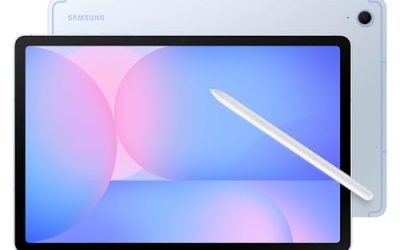
For a student who wants one tablet to do both jobs without extra purchases, the Galaxy Tab S10 FE is the balanced starting point. Its listing includes the S Pen in the box, names a 90 Hz refresh rate for note-taking, and adds IP68 water resistance, which suits a device that travels in a backpack through rain, coffee shops, and crowded lecture halls. The Exynos 1580 processor and 128GB of storage cover note apps, textbook readers, and everyday coursework, while the silver US Version listing keeps the configuration simple to identify when you order.
Specs
- Display: 10.9-inch display, 90 Hz refresh rate
- Processor: Exynos 1580
- Storage: 128GB
- Stylus: S Pen included in the box
- Durability: IP68 water-resistant
- Model number: SM-X520NZSNXAR
- Colour: Silver, US Version
Best for: Students who want handwriting, reading, and durability in one mid-sized tablet.
Watch out for: Confirm the S Pen is listed in the box contents of the exact offer, since bundles can differ.
ASIN: B0DVZSRJ8Q
Apple iPad 11-inch A16 128GB, Blue
The iPad suits students whose courses lean on textbook apps, library platforms, and reading services that are well established on iPadOS. Its 11-inch Liquid Retina display runs at 2360-by-1640 resolution with True Tone, which keeps long reading sessions comfortable under changing classroom light, and the A16 chip handles note apps, split-screen reading, and coursework without strain. Touch ID, Wi-Fi 6, and a USB-C connector round out a practical daily setup. The one planning point is the stylus: this listing supports two Apple Pencil models, but the pencil itself is a separate purchase.
Specs
- Display: 11-inch Liquid Retina display, 2360-by-1640 resolution at 264 ppi, True Tone
- Chip: A16 chip, 5-core CPU and 4-core GPU
- Storage: 128GB
- Connectivity: Wi-Fi 6, USB-C connector
- Security: Touch ID
- Stylus support: Apple Pencil (USB-C) and Apple Pencil (1st generation), sold separately
- Model number: MD4A4LL/A
- Colour: Blue
Best for: Students whose textbook and reading apps live in the Apple ecosystem.
Watch out for: Budget for the Apple Pencil separately, and check which of the two supported pencil models the listing pairs with this iPad.
ASIN: B0DZ75TN5F
Lenovo Idea Tab Pro 128GB, Luna Grey
Reading-heavy majors should look closely at the Idea Tab Pro, because its 12.7-inch 3K LCD display is the largest screen in this group and the easiest place to read a full textbook page or run a chapter beside a notes window. Lenovo markets this model directly as a student tablet, and the box contents help: the listing includes the Lenovo Tab Plus Pen and a folio case, so annotation and basic protection are covered from day one. The MediaTek Dimensity 8300 processor, 8GB of memory, and 128GB of storage give it headroom for large PDF libraries and multitasking between a reader and a notes app.
Specs
- Display: 12.7-inch 3K LCD display
- Processor: MediaTek Dimensity 8300
- Memory: 8GB
- Storage: 128GB
- Stylus: Lenovo Tab Plus Pen included
- Included components: Tablet, Lenovo Tab Plus Pen, folio case, USB-C to USB-C cable
- Model number: TB373FU
- Colour: Luna Grey
Best for: Students who read long, dense textbooks and want a large page on screen.
Watch out for: The 12.7-inch size is noticeably bigger to carry and to hold one-handed, so check the weight and dimensions against your bag and reading habits.
ASIN: B0F1NGFSNY
Samsung Galaxy Tab S10 Lite 128GB, Gray
The Galaxy Tab S10 Lite is the straightforward handwriting pick for students who want an included S Pen and room to grow. Its listing names the S Pen for note-taking, the Exynos 1380 processor, and storage expandable up to 2TB, which makes it the easiest tablet here to keep as your textbook and notes archive expands semester after semester. The 10.9-inch LCD at 2112 x 1320 resolution is sized for a single textbook page and for lecture notes, and the 6GB of memory with 128GB of storage covers the standard student mix of reader apps, note apps, and browsing.
Specs
- Display: 10.9-inch LCD, 2112 x 1320 maximum resolution
- Processor: Exynos 1380
- Memory: 6GB RAM
- Storage: 128GB, expandable up to 2TB
- Stylus: S Pen included in the box
- Model number: SM-X400NZANXAR
- Colour: Gray
Best for: Students who handwrite most notes and expect their file library to keep growing.
Watch out for: Check the memory card format and capacity the listing supports before buying expansion storage.
ASIN: B0FF5JJ3CP
Which One Fits Your Situation
You Handwrite Fast Lectures Every Day
Start with the Galaxy Tab S10 FE or the Galaxy Tab S10 Lite, because both include the S Pen and are built around note-taking in their listings. The S10 FE adds a 90 Hz refresh rate and IP68 water resistance for a harder commute, while the S10 Lite adds expansion up to 2TB. Either way, you can write from the first lecture without a second purchase.
You Read Long Textbooks More Than You Write
Choose the Lenovo Idea Tab Pro. The 12.7-inch 3K display shows more of each page at a readable size, split view works for a chapter beside your notes, and the included pen and folio case cover annotation and protection. For sustained textbook reading, that larger screen is the clearest advantage in this guide.
Your Courses Run on Specific Reading Apps
Pick the Apple iPad when your syllabus points you to textbook platforms, library apps, or course tools your department supports on iPadOS. The A16 chip, sharp Liquid Retina display, and Wi-Fi 6 make it a dependable reader and note companion. Just remember: the Apple Pencil is supported but not included, so treat it as part of the purchase.
You Want One Tablet to Last the Whole Degree
Think about storage growth and daily wear together. The Galaxy Tab S10 Lite expands up to 2TB, while the Galaxy Tab S10 FE adds water resistance for years of commuting. The Lenovo suits students whose reading load will get denser, and the iPad suits students settled in its app ecosystem. Pick the limits you will not outgrow by your final year.
Common Mistakes
- Assuming every stylus tablet includes the stylus, when some listings only support a pen that is sold separately.
- Choosing the smallest screen for dense, two-column textbook PDFs, then spending the semester pinching and zooming on every page.
- Filling 128GB with downloaded textbooks and lecture recordings in the first year, with no expansion route and no archive plan.
- Ignoring what is actually in the box, including whether a folio case or only a cable and quick start guide are included.
- Buying for entertainment specifications first and only later checking whether the note app and textbook reader you need run well on that platform.
Frequently Asked Questions
Can I read full textbooks on a 10.9-inch or 11-inch tablet?
Yes, for most textbooks a screen in that range shows a single page at a comfortable size, and both Samsung models and the iPad in this guide sit in that band. Dense two-column layouts, large diagrams, and split-screen study are where the Lenovo Idea Tab Pro and its 12.7-inch display pull ahead, because more of the page stays visible without zooming or scrolling after every paragraph.
Do I need a stylus for college note taking, or is typing enough?
Typing is faster for verbatim notes, but a stylus helps with diagrams, equations, textbook margin annotations, and marking up PDF handouts. Three tablets here include a pen in the box, so handwritten study costs nothing extra to try. On the iPad, the Apple Pencil is a separate purchase, so decide before buying whether your courses need one.
How much storage do I need for textbooks and notes?
Handwritten notes and ordinary e-textbooks are modest in size, so 128GB, the starting point for every tablet here, covers a typical student who syncs files to the cloud. Downloaded video lectures and large offline libraries change the maths quickly. If that is your workload, the Galaxy Tab S10 Lite and its expansion up to 2TB give you a growth path fixed-storage tablets cannot match.
Is an e-reader style tablet better for reading than these tablets?
A dedicated reading device can be gentler for plain prose, but college reading involves colour figures, charts, highlighted passages, and switching between a textbook and your notes. The four tablets here handle that mixed work directly, with colour displays, note apps, and stylus annotation in one device. For coursework, they are the more flexible tool.
More from Amazon
Programs that pair well with the guide above. Offers and eligibility are set by Amazon and may change.
Read from a large library of eBooks and audiobooks on any device. Check Amazon for current plans.
Explore Kindle UnlimitedAudiobooks and podcasts to listen to on the go. Eligible new members can start with a free trial.
Try Audible freeFree shipping on eligible items, Prime Video and more. Eligible new members can start with a free trial.
Start a Prime free trialAd-free music streaming. Eligible new subscribers can start with a free trial.
Try Music Unlimited freeAs an Amazon Associate we earn from qualifying purchases.