Key takeaways
- Tablets for textbook reading need large screens and a pen. See the Galaxy Tab S10 FE in detail, with display, S Pen, storage and study features explained.
As an Amazon Associate we earn from qualifying purchases.
A textbook is not a novel, and a tablet that is pleasant for novels can be frustrating for study. Textbook pages are dense. They carry figures, tables, worked examples, footnotes, and margin notes, often laid out for a large printed page. Shrinking that page onto a small screen forces constant zooming and scrolling, and the reading stops being reading and becomes page management. This guide therefore takes a different angle from a general reading roundup: it looks for a larger screen that can show a textbook page legibly, and for pen support that lets a student mark that page the way they would mark paper.
That angle also sets the boundary of this article. The device covered here is a general tablet chosen for textbook work, not a small dedicated e-reader. Its jobs are specific: display full textbook pages and PDFs without endless pinching, keep handwritten annotations natural with a pen that comes in the box, hold a semester of files without storage anxiety, and survive being carried in a bag every day. One current model that could be verified against its Amazon US product information is covered in depth, with the checks a student or parent should repeat on the listing before ordering.
Disclosure: This article contains affiliate links. If you buy through these links, we may earn a commission at no additional cost to you.
The Pick at a Glance

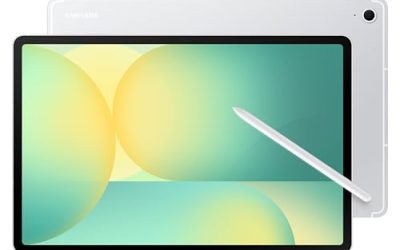
Samsung Galaxy Tab S10 FE, 128 GB, Wi-Fi, Blue, US Version, 2025 — ASIN B0DVZYQT3T — View on Amazon
Samsung’s listing for this configuration describes a 10.9-inch display, an Exynos 1580 processor, an IP68 water-resistant body, a 90 Hz refresh rate, and an S Pen included for note-taking, with the pen, a data cable, an ejection pin, and a quick start guide listed among the items in the box. For textbook reading, the combination that matters is the large page area plus the included pen: there is no separate pen purchase to research before the tablet can be used for annotation.
What Textbook Reading Demands From a Tablet
Page size comes first
Start with the displayed page, not the headline specifications. A screen around eleven inches can show a typical textbook page at a size where body text, captions, and figure labels are readable together, and where a two-column layout does not collapse into a narrow strip. That changes study behaviour. Instead of zooming into each paragraph, you read the page as its author laid it out, seeing how a diagram relates to the paragraph beside it, which is often where the understanding actually happens. Screen size also decides whether split study is practical: a textbook on one side and a notes app on the other only works when each side remains legible.
The pen must be part of the plan
Highlighting with a fingertip is clumsy, and typing every note slows reading down. A proper stylus lets you underline, circle a term, sketch a quick diagram in a margin, and write an equation by hand at the speed of thought. For textbook use, check three things on the product page. First, whether a pen is included or sold separately, because that changes what you need to order. Second, whether the tablet is described for note-taking with that pen, rather than mere touch compatibility. Third, what handwriting features the maker describes, such as help that tidies handwritten notes or converts written equations into text, which are genuinely useful when notes are later revised.
Performance should disappear into the background
Textbook files can be large, and study sessions jump between a textbook, a browser, notes, and sometimes a lecture recording. The processor and memory need to make those switches feel unremarkable. You are not buying speed for its own sake; you are buying the absence of interruption while you work. A smoother refresh rate also helps more than students expect, because long documents are scrolled constantly, and a screen that moves cleanly is easier to track with tired eyes late in a study session.
Storage and expansion decide a semester, not a day
One textbook is manageable. A course load is different: several large textbooks, slide decks, scanned chapters, and recorded material add up across a term. Check the built-in storage on the exact configuration you are ordering, and check whether the model supports expandable storage through a card slot, because configurations in the same family differ. The ejection pin listed in the box contents of this model is a small but telling detail, since it is the tool used for the tray that handles that expansion and connectivity hardware.
Durability is a study feature
A study tablet lives in bags, on library desks, beside drinks, and in hands between classes. A stated water-resistance level does not make a tablet careless-proof, but it does change the risk from an ordinary spill or a walk through rain. Weight matters too. A tablet read for hours should be holdable for a chapter and stable on a desk for note-taking, and those two uses pull in opposite directions, so look at how you actually study: mostly at a desk, mostly in an armchair, or mostly in transit.
The Galaxy Tab S10 FE for Textbooks in Detail
Display: room for a real page
The Amazon US product information for this configuration lists a 10.9-inch display with a 90 Hz refresh rate. For textbooks, that size is the central argument. A full page can be shown with its figures and tables in place, PDFs keep their original layout instead of reflowing into a phone-like column, and graphs remain large enough for axis labels to be read without zooming. The higher refresh rate makes scrolling through a long chapter smoother, which matters when you move back and forth between a question set and the section that answers it.
Colour is the other quiet advantage over a monochrome reading screen. Textbooks use colour deliberately: highlighted pathways in a biology diagram, shaded regions on a map, colour-coded equations, and photographs that carry information rather than decoration. A colour tablet shows the page as the publisher intended, so a student is not guessing what a shaded region meant.
S Pen: annotation in the box
This configuration lists the S Pen as included, and Samsung describes it as an S Pen for note-taking. The product information lists the built-in media for this variant as the tablet, the S Pen, a data cable, an ejection pin, and a quick start guide, so the annotation setup is complete on arrival. Samsung’s description of this family highlights handwriting support that helps tidy handwritten notes, straightening and aligning writing, and a math feature that can clean up a handwritten equation by turning it into text. For a student working through problem sets, that combination is practical: work the problem by hand on or beside the page, keep the working, and still end up with notes that can be read again during revision.
Pen reading also changes highlighting. Instead of selecting text with a dragging finger and hoping the selection lands correctly, you mark the page directly, draw attention to a figure, or write a question in the margin at the moment it occurs to you. Those marginal questions are often the most valuable notes a student makes, and they only get made when making them is effortless.
Processor and everyday study speed
The listing names an Exynos 1580 processor for this model. In study terms, that is the hardware behind opening large textbook files, switching between a textbook and notes, and searching within documents without the session stalling. No tablet makes a hard subject easy, but a tablet that responds immediately keeps attention on the subject rather than on the device, and over a long term that difference compounds.
Build, resistance, and carrying
Samsung lists this model IP68 water-resistant in the product title and information for this configuration. Treat that as protection for real student life: a spilled drink on a desk, rain between buildings, or a bag set down on a wet surface becomes less likely to end the tablet’s life. It is still a glass-fronted device that deserves a case for daily carrying, and the protection is not a reason to use it in water deliberately. The honest reading of the specification is resilience against accidents, which is exactly the risk a study device faces.
Storage in this configuration
This configuration is the 128 GB Wi-Fi model. For a textbook library, that capacity covers a course load of textbook files, documents, and notes for most students, especially since text-heavy files are modest beside media files. Because families like this one are sold in several storage and colour configurations, confirm the capacity printed on the exact listing you order rather than assuming every listing under the same model name describes the same configuration. The ASIN given in this article identifies this specific 128 GB Blue US Version configuration.
Specification Table
| Feature | Samsung Galaxy Tab S10 FE (Configuration Covered) |
|---|---|
| ASIN | B0DVZYQT3T |
| Display | 10.9-inch display, 90 Hz refresh rate |
| Processor | Exynos 1580 |
| Storage | 128 GB |
| Connectivity | Wi-Fi |
| Pen | S Pen included, described for note-taking |
| Water resistance | IP68, as stated in the product information |
| Model number in product information | SM-X520NLBNXAR |
| In the box (as listed) | Tablet, S Pen, data cable, ejection pin, quick start guide |
| Version | US Version, 2025 |
| Colour covered here | Blue |
How a Study Session Actually Runs on It
Picture an ordinary evening of study, because that is where these specifications either help or do not. You open the current chapter as a PDF or in your course reading app at full page size, with the diagram and the explanation visible together. When a paragraph defines a term you know you will forget, you circle it with the pen and write a two-word reminder in the margin. When the worked example uses a method you need to practise, you switch to notes, write the next problem by hand, and let the handwriting features tidy the result enough to revise from later. When you check something, the textbook and the notes can sit side by side, each still legible, instead of forcing you to memorise a page while you look at another screen.
None of that requires exotic features. It requires a page large enough to read, a pen that is already in the box, and a tablet responsive enough that switching tasks does not break concentration. That is the standard this model was chosen against, and it is the standard to apply to any alternative you consider: judge the study session, not the headline.
Who This Tablet Suits, and Who It Does Not
It suits a student whose reading is mostly textbooks, course PDFs, and documents with figures, tables, and colour that must be seen as laid out. It suits a student who annotates by hand and wants the pen included rather than researched separately. It suits a student who studies in several places and wants a stated water-resistance level as everyday insurance. And it suits a reader moving up from a phone or a small e-reader for study, who has discovered that page size, not willingness, was the problem.
It suits some people less well. A reader whose library is almost entirely novels, and who reads in bed for pleasure, will be happier with a smaller, lighter dedicated reading device built only for books, which is a different category covered separately on this site. A student whose course requires specific desktop software should confirm that the required tools run in the tablet’s ecosystem before treating any tablet as a main study machine. And a buyer who needs cellular connectivity away from Wi-Fi should check other configurations carefully, because the configuration covered here is the Wi-Fi model.
Buying Checks Before You Order
Confirm the ASIN on the listing matches the configuration you intend: B0DVZYQT3T identifies the 128 GB Wi-Fi Blue US Version covered here, and other colours, storage sizes, and bundles in the same family have their own listings. Confirm the S Pen is listed as included for that configuration, and read the box contents line rather than assuming it from the family name. Check the storage figure in the product information, not just the title, if your course load is large. Finally, plan a case for daily carrying at the same time as the tablet itself; a study device that travels every day should not spend its first week unprotected while an accessory is ordered later.
Frequently Asked Questions
Why not use a small e-reader for textbooks?
Page layout. Textbooks depend on large pages, figures, tables, and colour, and a small monochrome screen forces constant zooming and loses colour information entirely. A larger colour tablet shows the page as published, which is why textbook reading is treated as its own category here rather than as ordinary book reading.
Does the pen come with this tablet?
Yes, for the configuration covered here. The Amazon US product information lists the S Pen among the items included, and describes it as an S Pen for note-taking. Always re-check the box contents on the exact listing you order, because bundles and configurations in the same family can differ.
Can I take handwritten notes and keep them tidy?
Samsung describes handwriting support for this family that helps straighten, align, and adjust handwritten notes, and a math feature that can turn a handwritten equation into text. Those features are described by the maker for note-taking with the S Pen, and they are aimed at exactly the mix of writing, diagrams, and equations that textbook study produces.
Is this tablet suitable for reading in bright rooms?
The display is a conventional colour tablet screen rather than an e-ink page, so it behaves like other tablets in bright light: brightness and viewing angle matter, and it will not match an e-ink screen beside a sunny window. For indoor study, libraries, and classrooms, which is where textbook reading mostly happens, the large legible page is the deciding factor.
How much storage does a student need for textbooks?
For most course loads, the 128 GB in this configuration is ample for textbook files, documents, and notes, because text-based study files are small next to video. A student who also keeps large amounts of recorded lectures or media on the same device should check the storage figure in the product information and consider how they manage files across a full programme, not just a single term.
Verdict
Textbook reading rewards page size, colour, and a pen, and the Galaxy Tab S10 FE configuration covered here brings all three together: a 10.9-inch display that shows a real textbook page, an S Pen included for annotation and handwritten work, handwriting features described for study notes and equations, and IP68 protection suited to daily carrying. Verify the ASIN and box contents on the listing for the exact configuration you choose, add protection for everyday travel, and the tablet is ready to do the unglamorous work that matters: making a dense page readable, markable, and easy to return to.
More from Amazon
Programs that pair well with the guide above. Offers and eligibility are set by Amazon and may change.
Read from a large library of eBooks and audiobooks on any device. Check Amazon for current plans.
Explore Kindle UnlimitedAudiobooks and podcasts to listen to on the go. Eligible new members can start with a free trial.
Try Audible freeFree shipping on eligible items, Prime Video and more. Eligible new members can start with a free trial.
Start a Prime free trialAd-free music streaming. Eligible new subscribers can start with a free trial.
Try Music Unlimited freeAs an Amazon Associate we earn from qualifying purchases.