Key takeaways
- Looking for a tablet to read books on? See the Kindle Paperwhite 16 GB in detail, with its 7-inch glare-free screen, warm light, storage and battery explained.
As an Amazon Associate we earn from qualifying purchases.
The wording of this search is a little tangled, so it helps to say plainly what this guide covers. Nobody buys a book for a tablet. What readers are actually looking for is the other way round: a tablet, or a dedicated e-reader that works like a reading tablet, on which to read books comfortably for long stretches. That is the reading used here. This article looks at devices whose main job is reading books, not devices whose main job is video, games, or work, with reading added as an afterthought.
That distinction matters more than it first appears. A general tablet can open a reading app, but its screen, weight, battery rhythm, and constant stream of notifications are all designed for other tasks. A dedicated reading device removes most of that friction. The page looks like paper, the battery is measured in weeks rather than hours of screen time, and there is nothing on the device competing for your attention while you read. For a reader who finishes books rather than samples them, that focus is the whole point.
This guide covers one verified current model in depth rather than padding the page with devices that could not be confirmed. It explains who that model suits, who it does not suit, how its screen and light behave in ordinary reading situations, and what to check on the listing before you order, because Kindle names and generations are easy to confuse.
Disclosure: This article contains affiliate links. If you buy through these links, we may earn a commission at no additional cost to you.
The Pick at a Glance
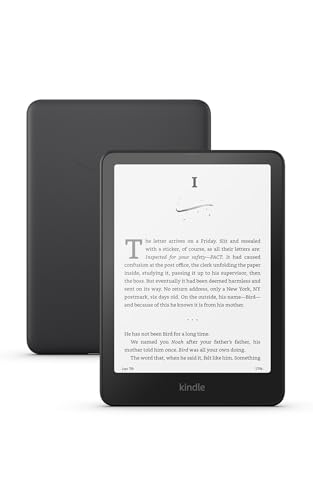
Kindle Paperwhite, 16 GB, 12th generation, 2024 release, Black — ASIN B0CFPJYX7P — View on Amazon
This is Amazon’s current Paperwhite in its standard storage configuration. It pairs a 7-inch glare-free display with an adjustable front light that can shift from white toward amber, waterproofing, and USB-C charging. It is a single-purpose reading device: it opens Kindle books, library loans through supported services, documents sent to the device, and audiobooks through Bluetooth, and it deliberately leaves social feeds and general apps off the device entirely.
How to Judge a Tablet for Reading Books
Start with the screen, not the storage
For reading, the screen decides almost everything. Look first at whether the display is glare-free and designed for text. An e-ink page reflects light much like paper, so a chapter read beside a window or under a lamp stays legible without the mirror effect of a glossy general tablet. Resolution matters at small font sizes: a sharp display keeps letter edges clean, which reduces the subtle strain of reading for an hour or more. Screen size is a balance. A larger page shows more words per screen and needs fewer page turns, but the device also has to stay light enough to hold in one hand in bed or on a train.
Understand the light properly
A dedicated reader lights the page from the front, guiding light across the surface rather than shining it directly into your eyes. The useful question is not brightness alone but range and tone. A light that adjusts from white to amber lets a reader soften the page in the evening, which many people find easier during the last reading session of the day. A reader who only reads in daylight will use the light mainly to even out shadows, while a night reader will treat the warm end of the range as essential.
Treat battery claims as a pattern, not a promise
Battery figures for e-ink readers are stated against a light daily reading pattern, with wireless off and the light at a moderate setting. Heavy reading, a bright light setting, wireless downloads, and listening to audiobooks over Bluetooth all shorten the interval between charges. Even with that caution, the rhythm is completely different from a general tablet. Charging becomes an occasional task you do between books, not a nightly routine you plan around, and that changes how casually you pick the device up.
Match storage to the kind of library you keep
Text books are small files, so even a modest storage size holds a very large library of ordinary novels and nonfiction. Storage starts to matter when the library includes audiobooks, which are far larger, or many illustrated titles, comics, and PDF documents. Think about what you actually carry. A text-only reader can choose the standard size with confidence. A listener who keeps many audiobooks on the device at once should weigh the larger configurations in the same family instead of assuming the standard size fits every habit.
Decide how much distraction you want
This is the judgement readers most often skip. A phone and a general tablet put messages, feeds, and browsers one tap away from the page, and for some readers that is fine. For others, it is the reason books go unfinished. A dedicated reader is a deliberate constraint. There is no feed to check at the end of a chapter, so the next chapter is the easiest thing to open. If your goal is simply to read more books, that constraint is a feature worth paying attention to, even though it never appears in a specification table.
The Kindle Paperwhite 16 GB in Detail
Display and page turns
The current Paperwhite uses a 7-inch Paperwhite display with a resolution of 300 pixels per inch, according to Amazon’s listing for this model. The listing describes it as the fastest Paperwhite so far, with a higher contrast ratio and page turns that are quicker than the previous generation. In reading terms, higher contrast keeps text distinct from the page background at smaller sizes, and faster page turns keep the rhythm of a long chapter from being interrupted by the device. The screen is glare-free, so the page stays readable in bright rooms and outdoors in a way a reflective tablet screen does not.
Seven inches is a considered size for books. It is noticeably larger than the 6-inch screen of older Paperwhite generations, so more of a page is visible at a comfortable font size, yet the device remains a one-hand object rather than a two-hand slab. Readers who mostly read standard novels and nonfiction will feel the extra space mainly as fewer page turns. Readers who enlarge text substantially will feel it as a page that still looks like a page, rather than a narrow column of a few lines.
Adjustable warm light
The built-in light adjusts from white to amber. During the day, a neutral setting lifts the page in dull indoor light. In the evening, moving toward amber softens the look of the page for reading in bed or in a dim room. The light is a front light, so it illuminates the text surface instead of projecting toward your face. Combined with the glare-free screen, that makes long sessions in mixed lighting easier to manage: you set the tone and level once for the room you are in, then forget about it.
Waterproofing and everyday handling
Amazon lists this generation as waterproof, with IPX8 in the product information for the Paperwhite family configuration. In practical terms, waterproofing for a reading device is about ordinary accidents and settings: reading in the bath, beside a pool, at the beach, or in a kitchen where splashes happen. It is not an invitation to read underwater, and the maker’s guidance on rinsing and drying still applies after exposure. The value is peace of mind in the places people actually read on holiday and at home.
The body follows the flush-front design of recent generations, with the screen surface level with the surrounding bezel. That removes the recessed lip that older models had, a lip that tended to collect dust along its edges. The device charges over USB-C, which means the same cable type used by most current phones and tablets can charge it, simplifying the small kit of cables a traveller carries.
Battery life
Amazon states that a single charge via USB-C lasts up to 12 weeks for this model. That figure follows the usual pattern for the category: it assumes a modest daily reading session, wireless off, and a moderate light setting. Read for several hours a day with the light raised, keep wireless on, or listen to audiobooks regularly, and the real interval will be shorter. The honest takeaway is the scale, not the exact number. Even a heavy reader is looking at a device that needs charging occasionally, in the rhythm of finishing several books, rather than a device that asks for a cable every night.
Storage, formats, and listening
The 16 GB configuration holds thousands of ordinary text books, in Amazon’s own description of the capacity. Supported reading material on Kindle devices includes Kindle format books, and documents can be sent to the device for reading in the same interface. This model also supports Audible audiobooks played through Bluetooth headphones or a Bluetooth speaker, since the device itself has no speaker for listening aloud. A reader who mixes reading and listening on the same title should remember that audio files use far more storage than the same book as text, and plan the library kept on the device accordingly.
There are no social media apps or general notifications on the device, a point Amazon itself makes in the listing. For book reading, that absence is central to the experience. The home screen is a library, the page is a page, and nothing else arrives while you read.
Specification Table
| Feature | Kindle Paperwhite 16 GB (12th Generation, 2024) |
|---|---|
| ASIN | B0CFPJYX7P |
| Display | 7-inch Paperwhite glare-free display, 300 ppi |
| Page turns | Stated as faster than the previous generation, with higher contrast |
| Light | Built-in adjustable light, white to amber |
| Storage | 16 GB |
| Charging | USB-C |
| Battery (maker statement) | Up to 12 weeks on a single charge under the stated reading pattern |
| Waterproofing | Waterproof design, IPX8 in product information |
| Audio | Audible audiobooks via Bluetooth headphones or speaker |
| Colour covered here | Black |
Who This Reading Tablet Suits
It suits a reader whose main goal is finishing books: novels at night, nonfiction on a commute, and a library that travels without weight. It suits a bath, pool, and beach reader who wants waterproofing as a standard part of the device rather than a case added later. It suits a reader who is easily pulled away by notifications and wants a screen that contains nothing but books. And it suits a traveller, because one charge covers a whole trip for most reading patterns and the device is thin enough for a jacket pocket or a small bag.
It suits some readers less well, and saying so matters. A student who needs to annotate large textbook pages, split a screen between a text and notes, or work through colour figures all day needs a larger, stylus-friendly tablet instead, which is a different category covered separately on this site. A reader who depends on a specific reading app that only runs on a general operating system will not find that app here. A reader who wants colour pages for comics or illustrated books should look at colour e-ink models as a separate comparison, checking each model’s own listing carefully, rather than assuming this monochrome page will serve that library.
Buying Checks Before You Order
First, confirm the generation on the listing. The Paperwhite name spans many years, and this article covers the 12th generation, 2024 release, identified by ASIN B0CFPJYX7P for the 16 GB Black configuration. Other colours and the larger Signature configuration in the same family carry their own listings, so match the ASIN to the exact variant in your basket rather than relying on the headline name alone.
Second, check the lockscreen description on the variant you choose, because Kindle configurations differ on whether sponsored content appears on the lock screen, and the listing states which applies to that variant. Third, confirm what is in the box, so you know whether you need to supply a USB-C cable or a power adapter of your own. Finally, if you plan to listen as well as read, confirm your Bluetooth headphones or speaker are available to pair, since listening on this device happens through Bluetooth rather than a built-in speaker.
Frequently Asked Questions
Is an e-reader like this better for books than a general tablet?
For long book reading, usually yes. The glare-free page, front light, light body, and weeks-long charging rhythm are all shaped around text, and there are no feeds or messages on the device to interrupt a chapter. A general tablet remains better when reading is only one of many tasks, or when you need colour, large pages, or a specific app.
Can this Paperwhite handle library books?
Kindle devices support borrowing through library services that lend in Kindle format in supported regions, and borrowed titles are delivered to the device like purchased ones. Availability depends on your library and region, so check your own library’s lending pages for the formats it supplies before relying on this as your only reading route.
How long does the battery really last?
Amazon states up to 12 weeks for a single charge under a light daily reading pattern with wireless off and a moderate light level. Longer daily sessions, brighter light, wireless use, and Bluetooth audio all shorten that interval. Most readers experience it as charging occasionally between books rather than on a fixed weekly schedule.
Is 16 GB enough storage?
For text books, comfortably so: ordinary novels and nonfiction are small files, and this capacity holds a library far larger than most people read in years. Storage becomes a real question when you keep many audiobooks or large illustrated files on the device at the same time, in which case a larger configuration in the same family is the relevant comparison.
Can I read in the bath or by a pool with it?
The device is built to a waterproof design with IPX8 in its product information, intended to withstand splashes and brief immersion of the kind that happens in those settings. Follow the maker’s care guidance after exposure, especially around drying the port before charging, and treat that protection as protection against accidents rather than a feature to test deliberately.
Verdict
For the job this keyword actually describes, a tablet for reading books, the Kindle Paperwhite 16 GB in its current generation is a focused and well-judged answer. Its 7-inch glare-free page, adjustable warm light, waterproofing, USB-C charging, and long interval between charges all serve one activity, and the absence of everything else is part of why it works. Check the generation and ASIN on the listing, choose the configuration that matches how much you listen as well as read, and the device will quietly do the single thing it was built for: keep a book in your hand, ready whenever you are.
More from Amazon
Programs that pair well with the guide above. Offers and eligibility are set by Amazon and may change.
Read from a large library of eBooks and audiobooks on any device. Check Amazon for current plans.
Explore Kindle UnlimitedAudiobooks and podcasts to listen to on the go. Eligible new members can start with a free trial.
Try Audible freeFree shipping on eligible items, Prime Video and more. Eligible new members can start with a free trial.
Start a Prime free trialAd-free music streaming. Eligible new subscribers can start with a free trial.
Try Music Unlimited freeAs an Amazon Associate we earn from qualifying purchases.