
A purpose-built desk treadmill such as the LifeSpan TR1200-DT3 or TR5000-DT7 suits people who plan to walk at a desk for hours every day, a folding walking pad such as a WalkingPad model or UREVO suits small spaces and occasional use, and a standing desk plus a compact walking pad is the most flexible route for most home offices. The right choice depends on desk height, walking speed, noise tolerance and floor space.
Our top picks


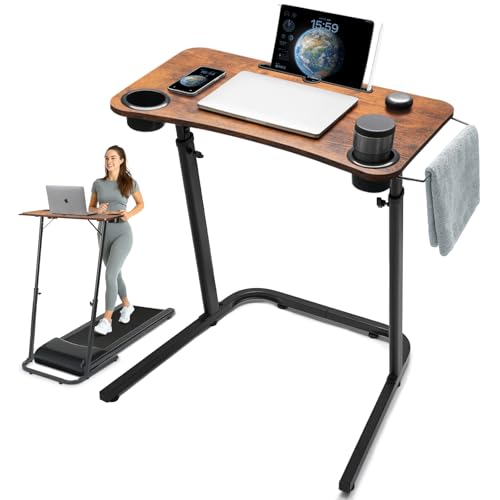
 Vhorilix Walking Pad Treadmill for Home
- Quiet & Reliable Motor Performance - Powered by…
- Compact Space-Saving Design - The compact walking pad…
- Lightweight & Easy to Move - Weighing approximately…
As an Amazon Associate we earn from qualifying purchases at no extra cost to you.
Treadmill Desk Options at a Glance
| Option | Best for | Key points from makers and reviewers | Limits |
|---|---|---|---|
| LifeSpan TR1200-DT3 | Daily slow walking at a desk | Desk treadmill with low-speed focus, console, designed for use under a standing desk, maker lists a residential warranty | Not designed for running; storing it takes space |
| LifeSpan TR5000-DT7 | Heavier use and longer sessions | Larger motor and belt than entry models, integrated desk-treadmill design | Mid-range to premium tier |
| WalkingPad (KingSmith) folding models | Small spaces and apartment storage | Slim folding frames, remote or app control, quiet at low speed per reviewers | Shorter belts, lighter motors |
| UREVO under-desk walking pads | Budget walk-and-work setups | Compact walking pads with remote control and folding designs | Fewer features; support and warranty vary |
| Standing desk plus walking pad | Flexible setups and mixed use | Pair any desk that reaches suitable height with a compact pad | Check height clearance and weight limits |
Models are refreshed often, so check the maker’s current page for exact speeds, belt dimensions, user weight limits and warranty. Details here are general and attributed to the makers’ own descriptions.
What to Look For
Speed range and walking pace
Most people who type or take calls on a treadmill desk walk slowly, commonly a leisurely pace of around two miles an hour or less. Desk treadmills are designed around that speed range, while models built for jogging usually offer higher top speeds and larger motors. Check the lowest speed available, because some units start faster than comfortable desk walking.
Desk height and clearance
The biggest practical issue is height. Your desk needs to be tall enough for your elbows to sit at a comfortable angle when you stand on the belt, and the treadmill deck adds extra height under your feet. A height-adjustable desk with enough range is the usual answer. Measure your standing elbow height with shoes on, add the deck height the maker lists, and compare with the desk’s maximum height.
Belt size and motor
Slim belts feel tighter than full-size treadmill belts. For a normal gait, makers generally suggest a belt length that matches your stride, and many walking pads are narrower than full-size machines. Motor strength and continuous-duty ratings affect how well the unit handles hours at low speed. Look for continuous-duty language from the maker rather than peak figures alone.
Noise and vibration
Noise matters if you take calls or share a home. Reviewers often describe folding walking pads as relatively quiet at low speeds, but belt and motor sound still varies between units. A rubber mat underneath reduces vibration and protects floors.
Safety
Use the safety key or clip supplied by the maker and keep the area clear. Do not step onto a belt that is moving faster than comfortable, and keep children and pets away. Look at the user weight limit before purchase and follow the manual on lubrication, belt alignment and power. If you have a medical condition, balance issues or are recovering from injury, ask your doctor before walking while working. Plug the unit directly into a suitable outlet as the manual advises, and have an electrician check any questionable wiring.
Folding and storage
Walking pads that fold flat or slide under a sofa or bed suit renters. Full desk treadmills often need more storage space, although some have transport wheels.
Picks by Need
LifeSpan TR1200-DT3: classic desk treadmill
LifeSpan is one of the best-known names in treadmill desks. The TR1200-DT3 is a widely reviewed entry-level desk treadmill, designed for walking while working rather than running. It suits people who want a console, a solid deck and a unit built for desk use. The maker presents it for slow, steady walking.
LifeSpan TR5000-DT7: more robust build
The TR5000-DT7 is positioned above the entry model with a larger deck and stronger build. It suits heavier users and those who will spend many hours a day on the belt. Because it is larger, it needs more floor space and has a higher purchase tier.
WalkingPad: slim and foldable
WalkingPad, from KingSmith, popularized the flat-folding walking pad. Reviewers often point to its slim design, remote control and relatively quiet low-speed operation. It is a good fit for small homes. Check which model you are considering, since belt sizes and top speeds vary.
UREVO: budget walking pads
UREVO sells compact folding walking pads that target buyers who want a simple walk-and-work setup at a lower tier. Compare belt size, listed weight limit and warranty carefully.
Standing desk plus pad: flexible combination
Many buyers pair a height-adjustable desk with a compact pad. This lets you stand, walk, or sit with the pad folded away. It works best if the desk reaches a suitable height and is stable under typing.
Budget Tiers Explained
| Tier | Typical features | Trade-off |
|---|---|---|
| Budget | Folding walking pad, small motor, basic remote | Shorter warranty, smaller belt, lighter build |
| Mid-range | Stronger motor, longer belt, better support from established makers | More storage space needed |
| Premium | Integrated desk treadmill with console, heavy-duty build and longer coverage | Space, weight and outlay |
Pick X If… Decision Table
| Pick this | If you |
|---|---|
| LifeSpan TR1200-DT3 | want a dedicated, well-known desk treadmill for daily walking |
| LifeSpan TR5000-DT7 | want a sturdier build for long daily use |
| WalkingPad | need easy storage in a small space |
| UREVO | want a budget way to try walking while working |
| Desk plus pad | want the freedom to switch between sitting, standing and walking |
Setup and Care Notes
- Measure ceiling and door heights if you plan to use a full-size unit.
- Put a mat under the treadmill to reduce vibration and protect flooring.
- Lubricate the belt only as the maker’s manual directs.
- Keep the belt centered and clean; follow alignment steps in the manual.
- Wear flat, supportive shoes.
- Do not exceed the maker’s listed user weight or speed.
- Use the safety key and unplug when not in use.
Alternatives
Under-desk bike or pedal exerciser
A bike takes less space, makes less noise and is easy to use during calls. It does not give the same walking motion but is a lower-commitment way to add movement.
Standing desk alone
If you want variation in posture without full walking, a sit-stand desk with an anti-fatigue mat is simpler and cheaper.
Regular walking breaks
Short breaks and walking meetings are free alternatives that suit people who find typing on a moving belt difficult.
Getting Started Sensibly
Build up slowly
New users often start with short sessions of ten to twenty minutes and add time over several weeks. Standing and walking for long stretches can tire feet, calves and the lower back if you are not used to it. Wear supportive shoes and take breaks to sit.
Set up the workstation for walking
Raise your monitor so the top of the screen is near eye level and keep your wrists neutral on the keyboard. A separate keyboard and mouse help, because laptop screens are rarely at a good height. A monitor arm can make fine adjustments easier.
Plan your tasks
Walking suits email, calls, reading and routine admin. Tasks that need precise mouse work, drawing or fine editing are often easier when seated or standing still. Many people alternate: walk for part of the day, stand for another part and sit when concentration demands.
Consider the floor and the neighbors
A treadmill adds vibration and some noise. A thick mat helps on hard floors, and upper-floor apartments may want extra isolation. Make sure the machine sits on a flat, level surface with clear space around the belt.
Power and cables
Run the power cord where it cannot be stepped on or pulled. Use only the plug or outlet type the manual specifies, and ask an electrician if you are unsure that your outlet suits the load. Do not use damaged cords.
Common Mistakes
- Buying a treadmill before checking that the desk can rise high enough.
- Choosing a model with a high minimum speed that is too fast for typing.
- Ignoring the user weight limit or the continuous-duty rating.
- Forgetting storage: a folding model still needs a spot to live.
- Skipping belt lubrication and maintenance steps listed in the manual.
Frequently Asked Questions
Can I type while walking on a treadmill desk?
Many people can at slow speeds after some practice, although fine mouse work or detailed design may be harder. Start slowly and increase time gradually.
What speed is best for walking at a desk?
Most users choose a slow, comfortable pace. Choose a treadmill with a low minimum speed and set it to a pace where you can type and talk without strain.
Do I need a special desk?
You need a desk that can reach a comfortable height while you stand on the belt. A height-adjustable desk is the usual choice. Measure carefully before buying.
Are walking pads loud?
Reviewers often describe them as fairly quiet at low speeds, but noise differs by model and floor. Use a mat and check feedback from owners.
Can I run on a desk treadmill?
Desk treadmills and many walking pads are designed for walking. Check the maker’s maximum speed and use guidance, and do not run on a model not rated for it.
Is it safe for everyone?
Not necessarily. If you have balance problems, joint concerns or other medical conditions, ask your doctor first. Follow the manual, use the safety key and keep children and pets clear.





