Key takeaways
- Six hours of screen-on data entry at an estimated 8 watts: 48 watt-hours.
- Two hours of GPS, cellular data and brighter outdoor use at 12 watts: 24 watt-hours.
- One hour of standby and intermittent scanning at 3 watts: 3 watt-hours.
Best Rugged Tablets for Work, Travel & Outdoors
The Dell Latitude 7230 Rugged Extreme is the strongest all-round choice for demanding fieldwork, while the Samsung Galaxy Tab Active5 is the better travel-friendly option and the Getac ZX10 offers an excellent balance of screen size, sunlight visibility, and protection.
The best rugged tablets are not simply the ones with the thickest cases. For real-world buying decisions, compare the rated drop height, water and dust protection, screen brightness, battery design, available ports, and the way the tablet will mount in a vehicle, on a tripod, or in a worker’s hands. Manufacturer configurations can vary, so treat the figures below as representative specifications rather than universal specifications for every model.
Our top picks

![AGM PAD P2 Active Rugged Android 14 Tablet with Case, Waterproof & Drop-Proof, Widevine L1 & GMS Certified, 11" 90Hz FHD 480 NITS Display, MTK G99, 8000 mAh, 16(8+8) + 256GB[TF 2TB], GPS, Compass, OTG](https://m.media-amazon.com/images/I/411JDlJ3WrL._SL500_.jpg)

As an Amazon Associate we earn from qualifying purchases at no extra cost to you. Ratings are shown as listed on Amazon.
Quick comparison of the leading rugged tablets
| Tablet | Display and brightness | Protection rating | Battery approach | Useful ports and mounting | Best suited to |
|---|---|---|---|---|---|
| Dell Latitude 7230 Rugged Extreme | 12-inch, 1920 × 1200, up to 1400 nits | IP65; MIL-STD-810H; rated drops around 6 ft in specified configurations | Two hot-swappable batteries; configuration-dependent capacity | USB-A, USB-C, Ethernet, serial and docking options vary by configuration | Utilities, construction, public safety, vehicle-based fieldwork |
| Getac ZX10 | 10.1-inch, 1920 × 1200, up to 800 nits | IP66; MIL-STD-810H; approximately 5-ft drop rating | Removable battery, approximately 49 Wh in common configurations | USB, optional serial, pogo-pin dock and vehicle-mount accessories | Outdoor inspections, logistics, mapping and maintenance |
| Panasonic Toughbook G2 | 10.1-inch, 1920 × 1200, approximately 1000 nits | IP65; MIL-STD-810H; approximately 4-ft drop rating | Bridge battery and removable battery options; extended battery configurations available | USB-A, USB-C, Ethernet, serial and modular expansion options | Industrial systems, engineering and long-term fleet deployment |
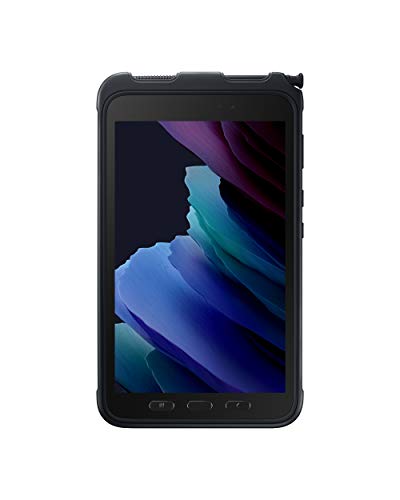
| Samsung Galaxy Tab Active5 | 8-inch AMOLED, 1920 × 1200, approximately 600 nits | IP68; MIL-STD-810H; rated for drops of roughly 1.5 m with the supplied protective solution | 5050 mAh removable battery; replaceable battery operation supported | USB-C, microSD, pogo-pin charging and keyboard or vehicle accessories | Travel, warehouse work, delivery rounds and mobile forms |
Best rugged tablet by situation
Best for demanding fieldwork: Dell Latitude 7230 Rugged Extreme
Choose the Dell when the tablet will spend much of its life in trucks, on construction sites, around machinery, or in bad weather. Its 12-inch display gives maps, drawings and inspection forms more usable space than an 8-inch tablet, and the high-brightness panel is better suited to direct daylight.
The major advantage is the battery system. Dual hot-swappable batteries can keep the tablet running while one pack is replaced, provided the tablet is configured and operated according to Dell’s battery-swap requirements. That is more useful than simply quoting a large battery capacity: a field worker can carry charged spares instead of waiting beside a charger.
The trade-off is size and weight. A rugged Windows tablet with enterprise ports and a reinforced chassis is much less comfortable to carry all day than a consumer tablet. It is also excessive for basic note-taking, navigation and inventory scanning.
Best for outdoor inspections: Getac ZX10
The Getac ZX10 is a strong middle ground for inspectors, survey crews, transportation workers and maintenance teams. Its 10.1-inch screen is large enough for plans and GIS applications, while the 800-nit display is more practical outdoors than many ordinary tablets.
Its IP66 rating provides stronger protection against water jets than an IP65 device, although neither rating means the tablet should be deliberately submerged. The removable battery and optional vehicle or office docks also make it easier to support a mixed mobile-and-desk workflow.
Android can simplify deployment when the workforce already uses Android applications, but confirm that your specialist software, barcode tools, printers and VPN support the required Android version before ordering.
Best for industrial Windows software: Panasonic Toughbook G2
The Toughbook G2 is aimed at organizations that need Windows applications, legacy interfaces and a supported fleet rather than the lowest purchase price. Its modular design can accommodate expansion options such as serial communication, Ethernet and specialized data connections, depending on the selected configuration.
This matters when a tablet must connect to diagnostic equipment or industrial controllers. A thin consumer tablet may require adapters, hubs and extra failure points. The Toughbook’s replaceable and expandable design is less elegant, but often easier to maintain over several years.
Buyers should pay close attention to the exact G2 generation, processor, memory, storage and expansion modules. Two units carrying the same family name can have substantially different performance and connectivity.
Best compact option for travel: Samsung Galaxy Tab Active5
The Galaxy Tab Active5 is the most convenient choice when portability matters more than a large screen or legacy ports. It fits into a small bag, supports a removable battery, includes a programmable key, and works with a rugged protective cover and pogo-pin accessories.
Its IP68 rating is useful around rain, dust and accidental splashes, but the smaller display makes detailed CAD drawings, long forms and map editing less comfortable. The approximately 600-nit screen is adequate for many outdoor tasks, though high-brightness Windows rugged tablets are easier to read under harsh sun.
How to interpret the durability specifications
Drop rating
A quoted drop height is a controlled laboratory result, not a guarantee that every fall will be harmless. The test may use a particular orientation, surface, accessory and operating condition. A tablet dropped onto a corner, charging plug or attached scanner can suffer damage below its advertised height.
For vehicles and warehouses, a rating around 4 to 5 feet is often sufficient. For construction, emergency response and equipment servicing, the additional protection and thicker chassis of a 6-foot-class tablet can justify the cost. Always consider the keyboard, docking connector and attached hand strap as part of the impact system.
Waterproofing
IP65 means protection from dust and water jets. IP66 adds stronger water-jet protection. IP68 generally indicates dust protection and temporary immersion under specified conditions, but the manufacturer’s depth and time limits matter.
Rinseable does not mean maintenance-free. Salt water, mud, concrete dust and cleaning chemicals can damage seals and connectors over time. Close all port covers before exposure, remove grit before opening them, and follow the manufacturer’s cleaning instructions rather than using aggressive solvents.
Screen brightness
Brightness is measured in nits, but glare, the screen coating, viewing angle and automatic dimming also affect outdoor readability. For frequent direct sunlight, aim for approximately 800 to 1400 nits. Around 600 nits can work for short outdoor tasks, especially when the user can shade the screen, but it offers less margin on bright days.
Ports and mounting: the details that affect daily productivity
USB-C is convenient, but it does not replace every professional connection. Check whether the exact configuration includes full-size USB-A, Ethernet, serial communication, HDMI, barcode-scanner support or an expansion connector. If a tablet will connect to diagnostic hardware, confirm the connector and driver requirements before purchase.
Mounting is equally important. A vehicle installation usually needs a powered dock with a locking mechanism, not a generic suction holder. For standing inspections, a hand strap reduces drops and fatigue. For surveying or photography, look for a compatible tripod or RAM-style mounting solution. A dock that charges through pogo pins is preferable to repeatedly opening a USB port in dusty conditions.
Battery life: calculate for your actual shift
Advertised battery life often assumes light office activity, moderate brightness and a strong wireless signal. A useful planning method is to estimate your shift in segments:
- Six hours of screen-on data entry at an estimated 8 watts: 48 watt-hours.
- Two hours of GPS, cellular data and brighter outdoor use at 12 watts: 24 watt-hours.
- One hour of standby and intermittent scanning at 3 watts: 3 watt-hours.
This example requires about 75 watt-hours before accounting for cold weather, battery aging and conversion losses. A tablet with a 49 Wh battery would not reliably cover that workload alone, while a hot-swappable system could cover it with a spare. For a shorter four-hour route, the compact Galaxy Tab Active5 may be more practical than carrying a heavier Windows tablet.
Ownership realities and common mistakes
- Seals wear first: port covers, battery gaskets and dock contacts usually need more attention than the main chassis.
- Batteries age: budget for replacement packs rather than assuming the original battery will retain full capacity for the entire fleet life.
- Cold reduces runtime: keep spare batteries warm and avoid charging a very cold battery until it reaches a safe temperature.
- Accessories can void the advantage: a loose adapter, exposed USB hub or poorly fitted case can become the weak point.
- Clean before docking: grit on pogo pins or a charging connector can prevent charging and cause intermittent faults.
- Verify software first: rugged hardware cannot compensate for an application that lacks offline maps, required drivers or compatible barcode support.
Bottom line
Choose the Dell Latitude 7230 Rugged Extreme for maximum field resilience, dual-battery operation and a bright large screen. Choose the Getac ZX10 for a balanced outdoor Android deployment, and the Panasonic Toughbook G2 when modular Windows connectivity and long-term fleet support are priorities. For travel, delivery work and everyday mobile forms, the Samsung Galaxy Tab Active5 is the most portable choice. The right purchase is the one whose brightness, battery method, ports and mounting system match the workday—not merely the one with the highest protection number.