Key takeaways
- Find the best Surface Book for battery life, ranked by Microsoft battery estimates, screen size, and configuration, with renewed-listing checks before you buy.
If you are looking for the best Surface Book for battery life, the short answer is the 15-inch Surface Book 3. Microsoft rates it at up to 17.5 hours of typical device usage when connected to its keyboard base, the longest estimate in the Surface Book line. The 13.5-inch Surface Book 3 follows at up to 15.5 hours, while the earlier Surface Book 2 models were rated at up to 17 hours of video playback. Those numbers need care, because Microsoft used different test methods for different generations, and real runtime depends on brightness and graphics use.
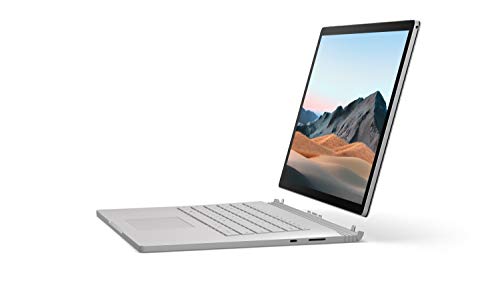

Every Surface Book below is a Microsoft Surface Book laptop, not an e-reader and not a Surface Pro or Surface Laptop. The line was discontinued, so most Amazon US listings are now new old stock, third-party stock, renewed units, or used units. A battery in a laptop first sold in 2020 has already aged, and a renewed listing may not include a new battery. Check the listing condition and return terms before you commit.
Quick Picks
Our Short List of 3
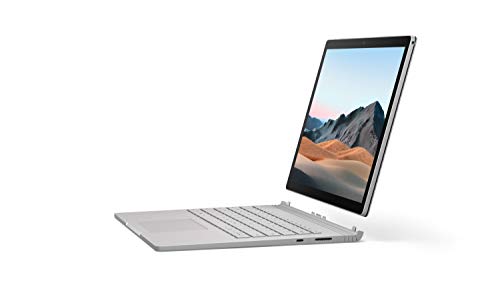
All 5 Picks at a Glance
| Product | Specs | Action |
|---|---|---|
| Microsoft Surface Book 3 15-inch, Core i7, 32GB RAM, 512GB SSD (B086QS5D19) | Check price on Amazon | |
| Microsoft Surface Book 3 15-inch, Core i7, 32GB RAM, 1TB SSD (B086QS1S5X) | Check price on Amazon | |
| Microsoft Surface Book 3 13.5-inch, Core i7, 32GB RAM, 512GB SSD (B086QRXLQZ) | Check price on Amazon | |
| Microsoft Surface Book 3 13.5-inch, Core i7, 32GB RAM, 1TB SSD (B086QSTP4B) | Check price on Amazon | |
| Microsoft Surface Book 3 13.5-inch, Core i5, 8GB RAM, 256GB SSD (B086QRJX6X) | Check price on Amazon |
How to Choose
Start With the Battery Estimate, Then Read the Test Behind It
Microsoft rates the 15-inch Surface Book 3 at up to 17.5 hours, the 13.5-inch Surface Book 3 at up to 15.5 hours, and the Surface Book 2 in both sizes at up to 17 hours. Those numbers are not directly comparable. Microsoft described the Surface Book 3 15-inch figure as typical device usage, based on web browsing, office work, and idle time with Wi-Fi on and brightness at 150 nits. The Surface Book 2 figure was based on video playback. A mixed-use test and a video-playback test stress different parts of a laptop, so a small gap on paper does not prove one machine will always outlast the other by that amount. Use the estimates to rank sizes within the same generation.
Understand the Two-Battery Design
Every Surface Book has two batteries: one in the detachable tablet section, known as the clipboard, and one in the keyboard base. The clipboard battery alone lasts only a few hours, because it is small and powers the display and tablet hardware on its own. The keyboard base holds the larger battery, and the combined total produces the long headline figure. If you detach the screen often, runtime will fall sharply, even if the same machine lasts a full working day when attached to the base. A buyer who wants long tablet sessions should plan around the clipboard battery, not the combined figure.
Choose the Screen Size for Runtime, Not Just for Portability
Screen size is the clearest battery-life divider in the Surface Book 3 range. The 15-inch models carry a larger total battery capacity, and Microsoft rates them two hours higher. The 15-inch screen uses more power, but the larger base battery more than compensates in the published estimates. The 13.5-inch models are easier to carry and still carry a strong estimate of up to 15.5 hours. If battery life is your first priority, the 15-inch Surface Book 3 is the logical first choice. If you travel light, the 13.5-inch models trade a little rated runtime for a more portable shape.
Weigh the Processor and Graphics Against Battery Drain
The entry 13.5-inch Surface Book 3 uses a 10th Gen Intel Core i5 processor with Intel Iris Plus integrated graphics, which draws less power under light loads than a discrete graphics processor. The Core i7 configurations add a discrete NVIDIA graphics processor in the keyboard base: a GTX 1650 Max-Q in the 13.5-inch Core i7 models and a GTX 1660 Ti Max-Q in the 15-inch models. That hardware helps with photo editing and graphics-heavy apps, but it can shorten runtime when active. The laptop can switch between integrated and discrete graphics, so light work such as writing and browsing does not always wake the discrete chip. Heavy graphics work and external displays draw more power on any configuration. If your longest days are mostly writing and office apps, the Core i5 model may give the most forgiving real-world runtime for its size. If they include graphics work, choose a Core i7 model and carry the charger.
Check Memory and Storage for the Way You Actually Work
Memory and storage do not set the battery rating, but they decide whether a configuration stays usable for a full day without slowing down. A machine with 8GB of memory can handle writing, browsing, and office apps, but it will struggle sooner if you keep many apps open at once. A machine with 32GB handles heavy multitasking and large documents with more headroom. Storage matters too: 256GB fills quickly, while 512GB and 1TB give room to keep work on the device instead of relying on cloud sync. Choose enough memory and storage for a long day away from a charger.
Remember That Age and Condition Now Matter as Much as the Original Rating
The Surface Book 3 was released in 2020, and Microsoft ended driver and firmware servicing for it in April 2025. The Surface Book 2 is older still, and its servicing has also ended. A lithium-ion battery loses capacity with age and charge cycles, so a used or renewed Surface Book may not reach its original headline figure, even in good cosmetic condition. Some renewed listings describe battery condition, and some do not. A listing that says nothing about battery health is not proof of a healthy battery. Ask the seller for a battery health report if available, and check the return terms so you can confirm runtime in your own use. Treat the published estimate as a ceiling for a fresh battery, not a guarantee for that unit.
Match the Charger and the Ports to Long Days
The Surface Book 3 15-inch ships with a higher-wattage power supply than the Surface Book 2, which helps when the laptop is under combined processor and graphics load while plugged in. A higher-wattage charger can restore charge faster when you work while plugged in. The Surface Book 3 also includes USB-C, USB-A, and a full-size SD card slot. Confirm the charger included with a renewed or used listing, because a missing or third-party charger can change charging speed.
The Best Surface Book for Battery Life Reviewed
Microsoft Surface Book 3 15-inch, Core i7, 32GB RAM, 512GB SSD (B086QS5D19)
The 15-inch Surface Book 3 with a 10th Gen Intel Core i7 processor, 32GB of memory, and a 512GB SSD is the strongest choice here for battery life. Microsoft rates this size at up to 17.5 hours of typical device usage when connected to the keyboard base. It pairs that rating with a discrete NVIDIA GeForce GTX 1660 Ti Max-Q graphics processor, a 15-inch PixelSense touch display at 3240 x 2160, and ports including USB-A, USB-C, and a full-size SD card slot. It suits a reader or writer who wants a large, sharp screen, a full keyboard, and the longest rated runtime in the line, with enough headroom for photo work and multitasking.
Who should skip it: anyone who wants a light, compact laptop for constant carrying, and anyone who plans to spend most of the day in detached tablet mode. The clipboard battery alone lasts only a few hours when detached. Confirm whether the unit is new old stock, third-party stock, renewed, or used, and check battery condition and return terms before buying.
Microsoft Surface Book 3 15-inch, Core i7, 32GB RAM, 1TB SSD (B086QS1S5X)
This 15-inch Surface Book 3 matches the top rating of up to 17.5 hours and adds a 1TB SSD, the largest storage option in this roundup for the 15-inch size. It uses the same 10th Gen Intel Core i7 processor, 32GB of memory, 15-inch PixelSense display, and GTX 1660 Ti Max-Q graphics as the 512GB model above, so the battery-life case is the same and the difference is storage headroom. It suits someone who keeps large document libraries or project files on the device, and who wants to avoid relying on cloud sync or external drives during long days away from a charger.
Who should skip it: anyone who works mainly with cloud files and a small local library, and anyone who prefers the smaller 13.5-inch shape for travel. Extra storage does not extend the battery rating. Confirm the listing condition and battery health information, because a renewed or used unit may not reach the original headline figure.
Microsoft Surface Book 3 13.5-inch, Core i7, 32GB RAM, 512GB SSD (B086QRXLQZ)
The 13.5-inch Surface Book 3 with a 10th Gen Intel Core i7 processor, 32GB of memory, and a 512GB SSD is the best smaller-size pick for battery life with serious multitasking headroom. Microsoft rates the 13.5-inch Surface Book 3 at up to 15.5 hours of typical device usage when connected to the keyboard base. It pairs that rating with a GTX 1650 Max-Q discrete graphics processor and a 13.5-inch PixelSense touch display at 3000 x 2000. It suits a reader, student, or professional who wants a portable Surface Book that can still handle graphics work and many open apps, and who will trade two hours of rated runtime for a smaller footprint.
Who should skip it: anyone whose first priority is the absolute longest rated runtime, because the 15-inch models are rated higher, and anyone who works mainly in detached tablet mode, where the clipboard battery limits runtime. Check the listing condition carefully, because many current listings are renewed or used.
Microsoft Surface Book 3 13.5-inch, Core i7, 32GB RAM, 1TB SSD (B086QSTP4B)
This 13.5-inch Surface Book 3 offers the same up to 15.5 hours estimate as the other 13.5-inch Core i7 models, with the largest storage option in the smaller size. It uses a 10th Gen Intel Core i7 processor, 32GB of memory, a 1TB SSD, and a GTX 1650 Max-Q discrete graphics processor, with a 13.5-inch PixelSense touch display. It suits someone who wants a compact Surface Book for travel and reading, but who also keeps a large local library or runs memory-hungry apps. The 1TB SSD means less time managing storage and less reliance on background syncing.
Who should skip it: anyone who wants the longest rated runtime, because the 15-inch models are rated two hours higher, and anyone who needs only modest storage. Confirm whether the unit is new old stock, renewed, or used, and check battery condition and return terms, because battery age is the main risk in a discontinued laptop.
Microsoft Surface Book 3 13.5-inch, Core i5, 8GB RAM, 256GB SSD (B086QRJX6X)
The entry 13.5-inch Surface Book 3, with a 10th Gen Intel Core i5 processor, 8GB of memory, and a 256GB SSD, is the most power-efficient configuration here for light work. Microsoft rates it at up to 15.5 hours of typical device usage when connected to the keyboard base, the same headline figure as the other 13.5-inch models, but it uses Intel Iris Plus integrated graphics instead of a discrete graphics processor, so light tasks place less demand on the graphics hardware. It suits a reader, writer, or student whose longest days are mostly text and web work, and who wants the detachable touch display and full keyboard without graphics power they will not use.
Who should skip it: anyone who edits photos or video, works with graphics-heavy apps, or keeps many demanding apps open at once. The 8GB of memory and 256GB of storage will feel limited sooner than the 32GB configurations. Check the listing condition and the included charger, because this discontinued configuration is often listed as renewed or used.
What to Check Before You Buy
Check the listing condition first. Surface Book 3 and Surface Book 2 are discontinued, so a listing may be new old stock, third-party stock, renewed, or used. Those conditions affect battery health, cosmetic condition, and included accessories. Read the full listing title and description, and do not assume a listing with a new-model title is a brand-new unit.
Check the battery health information if available. Some sellers provide a battery health report or a cycle count. If that information is missing, treat the published estimate as a ceiling for a fresh battery, not a promise for that unit. Confirm the return terms so you can charge the laptop fully and use it for a normal working day.
Check the exact configuration, the charger, and the support position. Confirm the model number, processor generation, memory and storage, and whether it includes a discrete graphics processor. In this roundup, the model numbers are SMN-00001 and SMV-00001 for the 15-inch Core i7 configurations, SLK-00001 and SLS-00001 for the 13.5-inch Core i7 configurations, and V6F-00001 for the 13.5-inch Core i5 configuration. Confirm whether the listing includes the original Surface Connect charger. Microsoft ended driver and firmware servicing for Surface Book 3 in April 2025, and Surface Book 2 servicing has also ended. Finally, remember the clipboard battery alone lasts only a few hours, so plan long reading sessions around laptop mode.
FAQ
Which Surface Book has the longest battery life?
The 15-inch Surface Book 3 has the longest published estimate, at up to 17.5 hours of typical usage when connected to the keyboard base. The 13.5-inch Surface Book 3 is rated at up to 15.5 hours, and the Surface Book 2 models were rated at up to 17 hours of video playback. Test methods differ between generations, and a used or renewed battery may not reach the original figure.
How long does a Surface Book last in tablet mode?
The clipboard battery alone lasts only a few hours, much shorter than the combined laptop-mode figure. If you detach the screen, expect to reattach it well before the end of a long day.
Is the Surface Book 2 still a good choice for battery life?
The Surface Book 2 was rated at up to 17 hours of video playback in both sizes, but it is an older machine and its driver and firmware servicing has ended. No verifiable Amazon US ASIN for a Surface Book 2 configuration was confirmed for this roundup, so the Surface Book 2 is named here without an ASIN and without a purchase link. If you find a Surface Book 2 listing, check its condition, battery health, and return terms with extra care.
Does the discrete graphics processor shorten battery life?
It can, when it is active. The discrete graphics processor in the Core i7 Surface Book 3 models helps with graphics-heavy work, but it draws more power than integrated graphics. Light work such as writing and browsing does not always wake the discrete chip, so the effect depends on what you are doing. For graphics-heavy sessions, expect shorter runtime and carry the charger.
Should I buy a renewed Surface Book for battery life?
A renewed Surface Book can be a practical way to buy a discontinued model, but battery health is the risk. A renewed unit may have a battery in good condition, or one that has already lost a noticeable share of its original capacity. Check the seller description for battery information, confirm the return terms, and run the laptop through a normal working day after it arrives. If the runtime does not meet your needs, use the return option.
Bottom Line
For the best Surface Book for battery life, choose the 15-inch Surface Book 3. Its up to 17.5 hours rating is the longest in the line, and the two configurations in this roundup pair that rating with 32GB of memory, a 10th Gen Intel Core i7 processor, and a choice of 512GB or 1TB of storage. If you prefer a smaller laptop, the 13.5-inch Surface Book 3 models are rated at up to 15.5 hours and are easier to carry, with the Core i5 model suiting light work and the Core i7 models offering more headroom for multitasking. Whichever size you choose, remember the Surface Book is discontinued, most current listings are renewed, used, or third-party stock, and battery age matters as much as the original rating. Confirm the listing condition and return terms before you buy, and plan your longest days around laptop mode rather than detached tablet mode.
Disclosure: As an Amazon Associate, we may earn from qualifying purchases.
More from Amazon
Programs that pair well with the guide above. Offers and eligibility are set by Amazon and may change.
Read from a large library of eBooks and audiobooks on any device. Check Amazon for current plans.
Explore Kindle UnlimitedAudiobooks and podcasts to listen to on the go. Eligible new members can start with a free trial.
Try Audible freeFree shipping on eligible items, Prime Video and more. Eligible new members can start with a free trial.
Start a Prime free trialAd-free music streaming. Eligible new subscribers can start with a free trial.
Try Music Unlimited freeAs an Amazon Associate we earn from qualifying purchases.