
Key takeaways
- Wear eye protection and hearing protection every time the cutter spins, and use a dust mask or respirator rated for fine dust.
- Use dust extraction and keep the area clear of sparks and flammable materials, especially with metals or oily woods.
- Keep hands away from the cutter, and know where the emergency stop is before you start a job.
- Do not leave a running job unattended, particularly with a new setup.
- Follow the manufacturer’s manual for electrical requirements, grounding and spindle use, and consult a qualified electrician if you need to add circuits.
- Some materials such as MDF and certain plastics release harmful dust or fumes; check the safety data and local guidance.
For most hobbyists and small-shop users, a Shapeoko 5 Pro from Carbide 3D or an Onefinity machine is the safer pick when you want to cut hardwood and aluminium in a garage workshop, the Carvera is the pick when you want an enclosed, tool-changing desktop machine, and an entry-level kit like the Genmitsu 3018 from SainSmart suits beginners who mainly want to learn on wood, plastics and soft materials. The right machine depends on cutting area, rigidity, dust and noise control, software comfort and how much you are prepared to tune.
Our top picks



As an Amazon Associate we earn from qualifying purchases at no extra cost to you.
What a desktop CNC router or mill does
A desktop CNC machine moves a spinning cutter along programmed paths to carve or cut material. Hobby machines range from small gantry routers that cut wood, plastics and soft aluminium to enclosed desktop mills with automatic tool changers. Unlike a 3D printer, they remove material, which means chips, dust, noise and real safety considerations. The machine is only part of the system: you also need cutters, a way to hold work down, dust collection, and software to design (CAD) and generate toolpaths (CAM).
At a glance
| Machine | Tier | Best for | Stated points | Limits |
|---|---|---|---|---|
| Carbide 3D Shapeoko 5 Pro | Premium | Serious hobbyists and small shops cutting wood, plastics and aluminium | The maker lists a rigid frame, several work-area sizes and a dedicated spindle option | Large footprint; needs a dedicated bench; software learning curve |
| Onefinity Journeyman and Woodworker | Premium | Woodworkers wanting a larger cutting field on a stable frame | The maker lists steel-reinforced designs and common router mounts | Mostly aimed at wood; assembly time; dust control is separate |
| Makera Carvera and Carvera Air | Mid-range to premium | Enclosed work, PCB and small metal parts, desk use | Maker describes an enclosed desktop mill; tool changing on some versions | Smaller work area; cost grows with accessories |
| Genmitsu 3018 series (SainSmart) | Budget | First CNC, signs, engraving, soft materials | Maker lists a small work area and hobby spindle | Limited rigidity; not suited to hard metals; small cutting area |
| Genmitsu ProVerXL and larger Sainsmart routers | Budget to mid-range | Users wanting more cutting area than a 3018 | Larger gantries and optional upgrades | Rigidity and tuning trade-offs |
Carbide 3D Shapeoko 5 Pro
Carbide 3D has long been a staple recommendation in hobby CNC discussions, and the Shapeoko 5 Pro is its higher-end machine. The maker describes a stiffer frame than earlier Shapeoko models and offers a choice of cutting areas, along with a spindle or router mounting options. Reviewers frequently praise Carbide’s documentation, software ecosystem and community. The trade-offs include the size and weight of the machine, the need for dust collection and the time spent learning feeds, speeds and workholding. Cutting aluminium is possible with the right cutter and settings, but it is an advanced step. Users should read the maker’s guidance on materials.
Onefinity
Onefinity machines are popular with woodworkers who want a larger work area at a mid-range to premium tier. The maker lists several sizes and states that its designs use steel components and linear rails. Reviewers often point to a straightforward assembly, an active user community and a controller that accepts G-code. Like most routers of this type, it is geared to wood and plastics, with aluminium cutting possible under careful conditions. Consider where it will sit, since a full-size machine needs generous bench space.
Makera Carvera
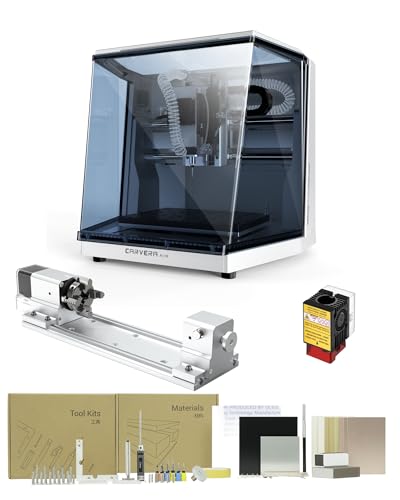
The Carvera, from Makera, is an enclosed desktop mill that sits between a hobby router and a small production machine. The maker describes a closed cabinet, which helps contain chips and noise, and some models offer automatic tool changing and work with materials such as wood, PCB substrates and softer metals. Reviewers see it as attractive for small parts and electronics prototypes, but the work area is small compared with open-gantry routers. Accessories, such as probes and workholding, add to the total cost. An enclosure helps with safety, but you must still use proper eye protection and follow the manual.
Genmitsu 3018 and related beginner machines
The Genmitsu 3018 series is a common first machine at a budget tier. The maker lists a small work envelope and a compact spindle, suitable for engraving, small signs, circuit board work and soft materials. Reviewers commonly warn that these machines are light, so expect slower cuts and careful tuning, and that they are not meant for hard metals. They are a low-risk way to learn the process, and a base to practise CAD and CAM before moving to a sturdier machine.
What to look for
Work area
Choose the largest material you plan to cut regularly, then add margin for clamps. A bigger machine demands more room and makes dust control harder.
Rigidity
Stiffness determines cut quality, particularly in harder materials. Compare the maker’s description of frame, rails and drive.
Spindle or router
A dedicated spindle runs quieter and is easier to control than a trim router, but some users prefer routers for simplicity. Check the maker’s listed power and collet sizes.
Software and controller
Ask which CAD and CAM software the maker supports. Some include their own free software, others expect third-party tools. G-code compatibility with common controllers is a plus.
Dust and noise
Plan for dust collection, ear protection and respiratory protection. Fine dust from wood and composites is a health concern.
Workholding
A spoilboard, clamps and a way to zero the machine accurately are essential. Poorly held work is a common cause of failed cuts and broken cutters.
Safety notes
- Wear eye protection and hearing protection every time the cutter spins, and use a dust mask or respirator rated for fine dust.
- Use dust extraction and keep the area clear of sparks and flammable materials, especially with metals or oily woods.
- Keep hands away from the cutter, and know where the emergency stop is before you start a job.
- Do not leave a running job unattended, particularly with a new setup.
- Follow the manufacturer’s manual for electrical requirements, grounding and spindle use, and consult a qualified electrician if you need to add circuits.
- Some materials such as MDF and certain plastics release harmful dust or fumes; check the safety data and local guidance.
Budget tiers
Budget tier: small kit routers like the Genmitsu 3018 for learning, engraving and soft materials.
Mid-range tier: larger-area routers and entry desktop mills with better rigidity.
Premium tier: machines such as the Shapeoko 5 Pro, Onefinity and higher-end Carvera setups, where accessories and dust control add to the total.
Pick X if you…
| Pick this | If you… |
|---|---|
| Shapeoko 5 Pro | want a rigid, well-supported machine for wood and some aluminium |
| Onefinity | want a large wood-focused cutting area |
| Carvera | want an enclosed machine for small parts and electronics |
| Genmitsu 3018 | are a beginner who wants to learn at a low cost |
| Larger Genmitsu router | want more area but are comfortable tuning |
Alternatives
- Laser engravers: better for fine surface work but not for deep 3D carving.
- 3D printers: additive, quieter, and cleaner for prototypes.
- Makerspace or CNC service: lets you try cutting without owning a machine.
Planning your first projects
New owners often rush into complex parts and break cutters. A better path is to start with simple two-dimensional jobs such as a name sign, a coaster set or a pocketed tray in softwood. These teach workholding, zeroing the machine and choosing feeds and speeds with low risk. Move on to profile cuts, then to three-dimensional carving, once your results are consistent. Keep a notebook of settings that worked for each material and cutter, as that record saves a lot of trial and error. Test new toolpaths with the cutter raised above the material before you cut, and watch the first minutes of every job closely. Buy a few good-quality cutters rather than a large assortment of cheap ones, and replace dull bits promptly, since dull cutters create heat and poor finishes. Join the maker’s user community, where owners share settings and troubleshooting advice for specific machines.
Frequently Asked Questions
Can desktop CNC machines cut aluminium?
Some can, with suitable cutters, light passes, lubrication and secure workholding. Light hobby machines struggle, while stiffer models like the Shapeoko 5 Pro and the Carvera are more capable. Read each maker’s material guidance.
Do I need CAD and CAM software?
Yes, you need a way to design the part and to convert it into toolpaths. Several makers offer free or bundled options, and third-party packages are also common.
How loud are these machines?
Router-based machines are loud, and an enclosure or dedicated spindle reduces noise. Use ear protection and consider placement away from living areas.
Is it safe to run a CNC machine at home?
It can be when you use protective equipment, dust extraction and proper workholding, and follow the manual. Never leave a job unattended, and be aware of fire and dust hazards.
How much space do I need?
Plan for the machine’s footprint plus room to access all sides, load material and store tools. A sturdy bench is important to limit vibration.
Which machine suits a total beginner?
A small kit such as the Genmitsu 3018 is a low-cost way to learn, while buyers who expect to grow may prefer starting with a sturdier machine to avoid replacing it.





