Our Top Picks

The best e-reader for reading in bed, among these listings, is a Kindle Paperwhite: its 7-inch glare-free display suits a dark bedroom, and newer titles add warm light, and the Signature Edition adds an auto-adjusting front light. Bed reading is different from commuting: you hold the device at an angle, often with one hand, and rely entirely on its built-in light. This guide covers eight Kindle options, from the basic model to color. Some listings are Like-New or International Version, and one older Paperwhite title does not name its generation, so we flag those clearly. Details come from listing titles only.
Fast answers
As an Amazon Associate we earn from qualifying purchases at no extra cost to you.




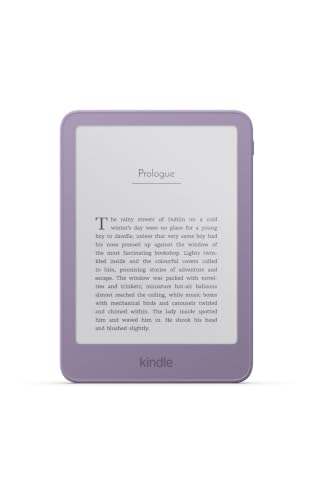


- Best overall for bed: Kindle Paperwhite 16GB, 7-inch glare-free display.
- Most convenient light: Paperwhite Signature Edition, with an auto-adjusting front light and wireless charging.
- Warm light named in the title: the newest Paperwhite (Graphite) and the older Paperwhite with a larger display.
- Smaller and lighter body: the basic Kindle, in a 6-inch version.
- For color covers and highlights: Kindle Colorsoft.
Spec snapshot
| Model | Key point from title | Best for |
|---|---|---|
| Paperwhite Signature Edition 32GB | Auto-adjusting front light, wireless charging, weeks of battery | Hands-off lighting |
| Paperwhite 16GB, 2024 model (new and Like-New) | 7″ glare-free display, weeks of battery | Core Paperwhite pick |
| Paperwhite 16GB, newest model, Graphite | Thinner, lighter, 7″ display, warm light | Warm-light bedtime reading |
| Paperwhite 16GB, larger display | Adjustable warm light, faster page turns | Older warm-light option |
| Paperwhite International Version | 7″ glare-free display, fastest Kindle per title | Buyers outside the US market |
| Kindle 16GB, 2024 model (new and Like-New) | Light and compact, high contrast ratio | Lowest-effort carry |
| Kindle 16GB, newest model, Ube | Thinner, lighter, faster, 6″ display | Small, light bedside reader |
| Kindle Colorsoft 16GB | Color display, color highlights, no ads | Covers and annotated books |
Every model, in plain language
Kindle Paperwhite Signature Edition 32GB
The title lists an auto-adjusting front light, wireless charging and weeks of battery life, in Metallic Black, with 32GB of storage. The auto-adjusting light is the standout for bed reading, since it can ease the brightness as the room changes, but check the page for how it behaves and whether it includes a warm tone. Wireless charging means a compatible pad on the nightstand can keep it topped up without a cable.
Pros
- Auto-adjusting light named in the title.
- Wireless charging for a tidy bedside setup.
Cons
- Highest-priced Paperwhite in this group.
- 32GB is more storage than most text readers need.
Who it’s for: readers who want the light to adjust itself.
Kindle Paperwhite 16GB (new and Like-New listings)
Two listings, both labelled as a 2024 model, describe this Paperwhite with the same wording: a 7-inch glare-free display and weeks of battery life, in Black. One is new and the other is sold as Like-New, which means it is not factory-fresh, so compare return terms and seller details. The title does not mention warm light, so confirm whether the light can be tinted before buying. Its main appeal is the larger screen at a moderate price.
Pros
- 7-inch glare-free display.
- Like-New option may cost less.
Cons
- Warm light is not mentioned in the title.
- Like-New stock may have different warranty terms.
Who it’s for: buyers who want the standard Paperwhite experience.
Kindle Paperwhite 16GB, newest model (Graphite)
This title calls itself the newest model and says it is thinner and lighter with a 7-inch display and warm light, in Graphite. That mix is attractive for bed use, where a lighter body is easier to hold above your face and warm light is easier to look at in the dark. The title gives no weight figure, so check the page. It is the cleanest match to the keyword among the standard Paperwhites.
Pros
- Warm light and a thinner, lighter body in the title.
- 7-inch display.
Cons
- No weight number to confirm the claim.
- “Newest model” wording can become outdated.
Who it’s for: bedtime readers who care about weight and warm light.
Kindle Paperwhite 16GB (larger display, adjustable warm light)
This older-style listing promises a larger display, adjustable warm light, increased battery life and faster page turns, in Black, but it does not name the model year. That makes it hard to tell where it sits against the others. Check the specifications on the page before choosing it over the newest Graphite listing. Its main value is warm light at what may be a lower price.
Pros
- Adjustable warm light named in the title.
- Faster page turns and longer battery life promised.
Cons
- No model year in the title.
- Unclear how it differs from newer Paperwhites.
Who it’s for: shoppers who want warm light and check details first.
Kindle Paperwhite 16GB, International Version
The listing is labelled International Version and describes a new 7-inch glare-free display and weeks of battery life, in Black. It also calls itself the fastest Kindle ever, which is a title-level claim. An international edition can differ in charger type, store setup and support terms depending on where you live, so confirm shipping and warranty details before ordering. Buy it only if you have a clear reason, such as living in the intended market.
Pros
- 7-inch glare-free display.
- Positioned as the fastest in the title.
Cons
- International edition may not suit US support or accessories.
- Title does not mention warm light.
Who it’s for: buyers who have confirmed it fits their region.
Kindle 16GB basic model (new and Like-New listings)
Both listings are labelled as a 2024 model and described as light and compact with fast page turns and a high contrast ratio, in Black. It appears in both a new and a Like-New listing. The title says nothing about the light type, so check whether it has a front light and any warm option on the product page. Its appeal is portability, since a small, light body is easier to hold overhead.
Pros
- Light and compact body per the title.
- High contrast ratio described.
Cons
- Lighting details are missing from the title.
- Like-New listing carries condition differences.
Who it’s for: readers who put weight and size first.
Kindle 16GB, newest model (Ube)
This one is thinner, lighter and faster according to the title, with a 6-inch display in an Ube colour. As with the 2024 basic Kindle, lighting features are not named, so confirm them. The smaller screen shows less text per page, so you turn pages more often; that suits short sessions but can feel fussy for long novels.
Pros
- Thin, light body in the title.
- Fun colour option.
Cons
- Smaller 6-inch screen.
- Light features not listed.
Who it’s for: readers with small hands, or short bedtime sessions.
Kindle Colorsoft 16GB
The Colorsoft title promises a color display that brings covers and content to life, color highlighting, and no ads, in Black. It is the only color model here. If you read comics, cookbooks or highlight heavily, the extra color is the reason to buy. For plain novels, the premium may not be worth it. The title does not say how the light behaves at night, so check that on the product page.
Pros
- Color display and color highlights.
- “No Ads” stated in the title.
Cons
- Premium over black-and-white models.
- Night-lighting details are not in the title.
Who it’s for: readers of illustrated books and heavy highlighters.
How we picked these
We collected current Amazon listings for Kindle e-readers and kept those that match reading in bed, grouping Like-New duplicates with their new counterparts. Our basis is published specifications, manufacturer documentation and buyer reviews, with details taken only from each listing title. Nobody on the team used or measured these units. Anything a title does not mention, such as weight, water resistance or warm light, is flagged for you to confirm on the product page before you buy. We also noted every condition label, because Like-New and International Version stock can differ in warranty and support.
What matters when you read lying down
Light quality and control
In bed, the built-in light is your only light. Look for a front light, an adjustable brightness, and ideally a warm tone. Auto-adjusting lights save fiddling. Many people find a softer, amber glow easier on the eyes at night; that is a comfort preference, not a health claim.
Screen size and glare
A 7-inch screen shows more text per page and reduces page turns, while a 6-inch screen is easier to hold. Glare-free finishes help when a bedside lamp or window reflects off the display. If your bedroom has a bright lamp, prefer a glare-free listing.
Weight, thickness and grip
Titles rarely give weights, so look at the specifications on each page. Lying on your side, a lighter body reduces hand fatigue, while a thinner body fits under a pillow. A case with a fold-back cover can help you hold it one-handed.
Page turns and reading posture
Bed reading usually means one hand holding the device and the other under a pillow. Faster page turns, mentioned in several titles, reduce the number of taps you wait on. Check whether the model supports page turns by button or only by touch, because a thumb swipe is easier on your side than reaching across. Propping the device on a stand or soft cover also helps if you read on your back.
Charging and ads
Wireless charging lets you drop the device on a pad. Weeks of battery life means you will charge it rarely, but warm light and brightness settings affect that. Some Kindle listings are ad-supported with lock-screen ads; the Colorsoft title says no ads, and others do not say, so check.
Bedtime setup checklist
- Confirm the light type: front light, warm tone, auto-adjust.
- Check whether the listing is new, Like-New or International Version.
- Look up the weight on the page and compare.
- Decide on one-handed page turning and a cover style.
- Use the return window in your first week of nightly reading to make sure the fit works.
Common buying errors
People often buy the cheapest listing without noticing it is Like-New or International Version. Others assume every Paperwhite has warm light, when only some titles mention it. Many forget that the screen size changes how often they turn pages, and choose a small model for long novels. Do not pay for 32GB or color unless you will use them. A related slip is ignoring the gap between a model name and its listing: the same Kindle name can appear as new, Like-New or International Version at different prices, and each has different terms. Finally, avoid falling asleep with the reader pressed against your face; a stand or cover that props it up is more comfortable.
Bottom line
If you want one answer, the newest Paperwhite in Graphite is the cleanest match for bed reading, thanks to its warm light, 7-inch display and lighter body. Choose the Signature Edition if auto-adjusting light and wireless charging matter, and the basic Kindle if you want something small. Pick the Colorsoft only for color content. Avoid Like-New and International listings unless the price gap is real and you accept the terms.
Related guides
- How To Store Books To Prevent Yellowing And Mold
- Book Stands For Hands-Free Reading
- Reading Glasses For Night Reading
Frequently asked questions
Which Kindle is best for reading in bed?
For most people the Paperwhite is the sensible starting point, since its listings describe a 7-inch glare-free display, and the newer titles mention warm light. The Signature Edition adds an auto-adjusting front light and wireless charging per its title. Buyers who prefer a smaller, lighter body may like the basic Kindle, but confirm its front-light features on the page.
Is warm light better for night reading?
Many readers prefer a warmer, amber tone in a dark room because it feels softer than a cool white light. This is a comfort preference, not a medical claim. Among these listings, the two newer Paperwhite titles mention warm light, so check the product page for the basic Kindle and the 2024 Paperwhite before assuming it is included.
Does a Like-New or International Version listing matter?
Yes. A Like-New listing is not sold as brand new, so warranty and return terms may differ. An International Version listing may be intended for another market, which can affect the charger, store settings and support. Read the condition, seller and shipping details, and compare them with the standard listing of the same model.
Is the Colorsoft a good choice for bedtime reading?
It depends on your books. The Colorsoft title promises a color display for covers, content and color highlights, and says it has no ads. If you mostly read plain text novels, a standard black-and-white model may be enough. Check how the front light behaves on the product page, since color screens can look different in a dark room.
How much storage does an e-reader need?
Text books take little space, so 16GB is plenty for most readers. The Signature Edition’s 32GB is mainly useful if you plan to store large comics or illustrated files. Titles list capacity, but not the number of books, so think about the file types you use rather than counting titles.